


Norton has joined the growing list of security giants offering standalone VPN products. What was once a fairly basic add-on to its antivirus service, though, has evolved into something far more serious. Recent updates have brought meaningful performance gains, tighter privacy practices, and a steady rollout of new features.
The company’s security software has always been some of the best on the market, but just how good is it? Will it keep your browsing safe and secure, or should you look elsewhere for privacy protection? I took it for another spin to find out just how much it’s improved and if it can challenge the best.
Read on to learn more, then see our roundup of the best VPNs for comparison.
Norton VPN’s last year wasn’t incremental—it was structural. Just in the last year or so it’s shown development in nearly every facet. WireGuard support, 25Gbps servers in major hubs, and a shift in data retention policies all point to a product trying to shed its “antivirus add-on” past.
The service introduced Double VPN and IP Rotation features and upgraded its OpenVPN protocol on Windows to OpenVPN DCO (Data Channel Offload) to boost performance.
Norton VPN also passed another no-logs security audit and an additional independent audit of its proprietary Mimic protocol.
While 2025 was a big year for Norton, 2026 looks set to continue the trend. Upcoming updates to the service this year are set to include WireGuard post-quantum encryption, a manual IP-rotation feature, and additional countries and server locations.
Over the last few years Norton VPN has been in the process of upgrading itself from antivirus add-on to standalone VPN with many of the same features as other top services. As such, Norton VPN has seen massive year-on-year growth and Norton clearly aims to make it a top-tier VPN. It’s already a very different service from what was offered in my last review.
Starting with the basics: Norton VPN offers up to five or 10 simultaneous device connections depending on your plan tier and a much improved server network — 100 server locations across more than 65 countries. Just in the last year, it has added 40 or so new country locations and 16 new city-level locations across all platforms, with more to follow this year.
Despite these improvements, Norton VPN’s server network is still an area that lags behind other competitors. Services such as NordVPN (209 locations across 167 countries) and ExpressVPN (170 locations across 105 countries) still operate much larger networks. Larger networks usually translate into less server congestion and a higher chance of bypassing geo-blocks.
For what it’s worth, Norton VPN’s servers are almost entirely physical servers. In fact, the service only recently began offering virtual servers in places such as India, Pakistan, Saudi Arabia, and a few others where it’s nearly impossible to operate secure, independent, and private servers.
Physical servers are generally recommended as they are often more secure, and tend to offer superior performance. Since some competitors overemploy virtual servers, the fact that Norton offers mostly physical servers should be seen as a win for privacy-conscious users.
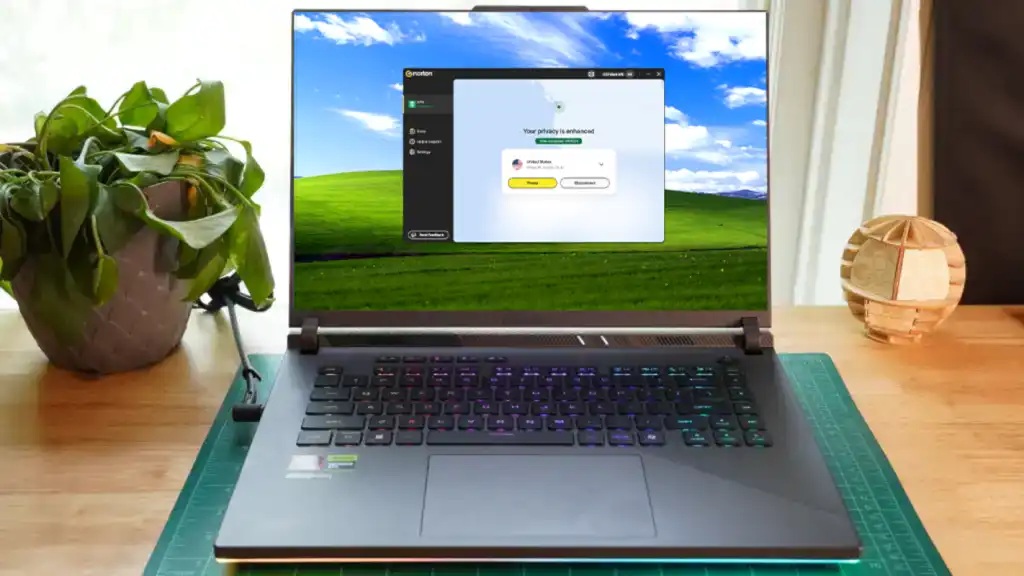
The Norton VPN app is pleasantly minimalistic. It has a Connect button below a drop-down menu with server locations. All of this is overlaid across a simple world map that highlights your current IP location with a pinpoint red dot. Along the left rail you’ll find a connection status icon along with menu options for Store, Help & Support, and Settings.
Kudos to the design team over at Norton because this has to be one of the most intuitive VPN interfaces I’ve ever encountered. No complicated menu systems or over-engineered tricks in sight.
When connected, the map will zoom in to the geographic location of the chosen server marked with a green dot. Your new IP address will be displayed in the middle of the screen and the VPN status icon on the left will say “Connected.”
Under the Settings menu you’ll find options for auto-connect, the split-tunneling feature, a kill switch, and you can change your protocol here as well. Norton VPN’s Standard plan—which I used for this review—doesn’t overwhelm with features and customization options, but it does provide all of the basics users are looking for.
The small gripe I have with Norton’s split tunneling is that it doesn’t offer reverse functionality. You can pick and choose which apps to exclude, but other services provide a reverse function that excludes everything and you can then select which apps to add to the VPN connection instead. It’s a slight omission, but one that other top VPNs implemented years ago.
Norton also has Double VPN and IP rotation connections. Both of these features are now available for all tiers and can be found on the home screen under the server drop-down menu. As of right now, each feature has limited available server options to choose from, with more likely coming in the future. The continued rollout of advanced features like these are commendable, and representative of how serious Norton is taking the development of its VPN service.
That is about it as far as features included in the Standard plan. If you opt for the Plus plan you’ll get access to anti-malware and anti-scam detection, a password manager, dark web monitoring, and 10GB of cloud storage. The Ultimate plan goes even further by providing 10 total device connections, customizable parental control features, additional security services for kids, and boosts cloud storage up to 50GB.
Norton VPN is available for Windows, MacOS, Android, iOS, smart TVs, some browsers. It notably isn’t available for Linux though.
Unlike other VPN services, Norton VPN only offers a yearly subscription plan for the service. There is no monthly plan available nor are there longer-term plans such as two or three years. This is a bit of an odd choice as it breaks the standard mold of what nearly every other VPN service offers.
Norton VPN offers three plan tiers: Standard, Plus, and Ultimate. Standard will set you back $39.99 for the first year or $3.33 per month with an auto-renewal rate of $79.99 per year. The Plus tier is $49.99 for the first year, or $4.17 per month and auto-renews at the higher rate of $109.99 for subsequent years. The Ultimate tier is $59.99 for the first year or $5.00 per month and auto-renews at $129.99 after that.
Even though the plans are only offered in 1-year increments, you can’t really argue with the value. The Plus plan in particular is an outstanding deal for the first year considering all of the extra features included.
Norton VPN can be paid for either by credit card, PayPal, or Google Pay
In my testing I measured connection speeds multiple times across Norton VPN’s servers in six different countries all around the world and then compared them to my baseline internet speed. Norton’s speeds were quite impressive. Across all locations tested, the average download speed was 66 percent of the base and the average upload speed was 69 percent of the base.
Those averages are a bit better than the last time I tested Norton VPN and enough to put it within striking distance of the fastest VPNs I’ve ever tested. Thanks to the adoption of OpenVPN DCO I also noticed modest performance gains on OpenVPN connections — speeds remained the same for me, but latency noticeably dropped compared to last time.
For those who have ultra-fast internet connections, the new 25Gbps servers should theoretically lead to vast performance increases. However, the connection I used to test with was not fast enough to even reach these speeds to begin with so I wasn’t able to verify these claims.
When it comes to Norton’s ability to unblock geo-restricted content on streaming services, it once again came through with flying colors. I was able to access all U.S.-based streaming content including Netflix, Amazon Prime, Hulu, HBO Max, and BBC iPlayer.
However, I once again encountered some issues with servers in Asia being blocked. As Norton doesn’t have the largest server network to choose from, I wasn’t always able to try and connect to other locations within blocked countries to see if they would work instead. Fortunately, Norton is prioritizing server network expansion so hopefully this issue will be resolved soon.
Overall though, Norton is plenty fast enough and its ability to unblock streaming services makes it a good choice if that’s a priority.
Norton VPN’s Windows app and Android app offer a choice between WireGuard, OpenVPN, and its own proprietary Mimic protocol. Mac and iOS devices can choose from WireGuard, IPSec, or Mimic protocols.
Norton’s Mimic protocol is designed to be ultra-effective at getting around geo-blocked content such as streaming services. And while in my testing it did just that, it did slow down my connection quite a bit. I’d still recommend sticking with WireGuard most of the time as it gives you the best mixture of speed and security.
Norton VPN has a no-logs policy which was confirmed via independent audit by security firm Versprite most recently in late 2025. This is the second such audit the VPN has undergone and it’s nice to see the service is sticking with regular audits. Additionally, Norton VPN underwent an independent audit — also by Versprite — on its proprietary Mimic protocol which determined its use poses no privacy risk to users.
According to the company’s Product Privacy Notice, Norton VPN collects several layers of non-browsing data that users should be aware of. This includes account information like your email and country, device and app telemetry such as OS, diagnostics, and crash reports, and IP-related data used to operate the service. While this isn’t tied to your browsing activity, it could still paint a partial picture of how and when you use the VPN.
In terms of retention, connection events to the VPN are stored for up to 12 months, application events (such as install, updates, and device name/type) are stored for up to 18 months, and the cumulative sum of data transmitted — but crucially, not the contents — are stored for up to 18 months as well. The key takeaway is that while your online activity isn’t logged, supporting data about your usage persists for longer than privacy-conscious users may like.
The VPN service and parent company Norton are all based in the U.S. which is an active member of the Five Eyes intelligence-sharing alliance and notorious for having intrusive data privacy laws.
If privacy is your main concern, it’s worth taking a hard look at Norton’s privacy policy for yourself. Norton VPN is solid for everyday use — like protecting your traffic on public Wi-Fi or hiding activity from your ISP — but it falls short of the strictest privacy standards. Overall, it’s reasonably private for casual users, but may not be ideal for those seeking maximum anonymity.
Norton VPN has come a long way from its origins as a basic antivirus extra. Today, it delivers strong speeds, a clean interface, and all of the functionality users expect from a serious VPN.
But the closer you look, the more it still feels like a security product wearing a VPN’s clothing. Data retention policies, U.S. jurisdiction, and a smaller server network keep it a step behind the privacy-first heavyweights.
Still, it’s a good fit for everyday users who want convenience and reliability. Its straightforward design and consistent performance make it especially appealing for users who want a VPN that doesn’t require much setup or tweaking.
Editor’s note: Because online services are often iterative, gaining new features and performance improvements over time, this review is subject to change in order to accurately reflect the current state of the service. Any changes to text or our final review verdict will be noted at the top of this article.
Author: Sam Singleton
Source: PCWorld
Reviewed By: Editorial Team
