


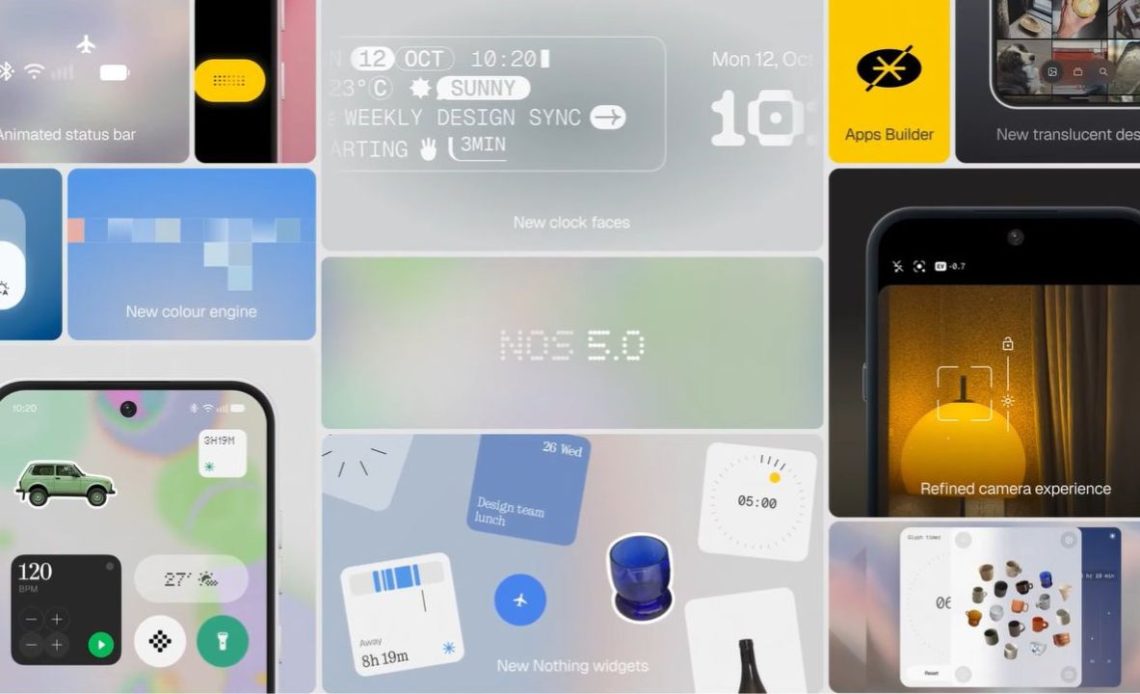
Nothing OS 5.0 has been announced with a major visual refresh, alongside new customization, usability, AI and workflow features. The update evolves Nothing’s existing design language with a new software material, the Geist typeface, a new colour engine and deeper personalisation options.
Nothing OS 5.0: Everything That’s New
The Nothing OS 5.0 update introduces a new software material that combines transparency with a subtle frosted effect. According to Nothing, this creates greater layering and depth while keeping the interface clean and focused, making it easier to distinguish what is in the foreground and background.
Nothing OS 5.0 also adopts the Geist typeface as its new system font. The company says Geist provides the clarity and versatility needed as its software ecosystem expands, while its dot-matrix design language will continue to be used more intentionally to add character without compromising readability.
Personalization is also getting a major upgrade with a new colour engine. Alongside the Classic theme and Android’s Dynamic Colours, the new engine takes cues from the user’s wallpaper and applies its colours to App icons, widgets and controls. Changing the wallpaper can therefore change these elements while Nothing’s predominantly Monochrome character remains underneath.
The update also brings a more expressive lock screen, with new clock designs called Gooey and Micrographics, customizable colour options and depth-effect wallpapers. Users can resize subjects on wallpapers using pinch-to-shrink editing, while surfaces gain more depth and system motion responds more naturally to gestures.
Nothing OS 5.0 also introduces a Split Control Panel, allowing Notifications and Quick Settings to be accessed independently. Users can swipe down from the left for Notifications and from the right for Quick Settings. Bluetooth can also be connected or disconnected directly from the Quick Settings tile with the new 1-Tap Quick Connect feature.
The home screen receives several practical changes. Batch editing allows users to select and move multiple app icons and widgets simultaneously, while the updated system also introduces smoother interactions across widgets, Recent Tasks and Live Updates.

Nothing is also bringing its Essential Apps Builder directly to the phone. Users can describe what they need in natural language and create lightweight, AI-powered applications without coding. These can then be placed directly on the home screen as AI-powered widgets.
The company says this changes what the home screen needs to accommodate, as user-created tools can now sit alongside traditional apps and widgets. Nothing describes this as one of the reasons it needed a new design system rather than simply another set of themes.
The Glyph Interface also gets a dedicated app in Nothing OS 5.0. The standalone Glyph app brings together controls for sound profiles, ringtones and schedules, while also providing access to the Glyph Timer widget.
New interactive widgets include Collector, which curates photographed items into visual showcases, and Away Time, which tracks screen-free periods and weekly habits.
Nothing OS 5.0 also expands the company’s Essential feature suite. Essential Voice adds real-time transcription and improved structural formatting for lists and notes, while SuperMic support allows direct audio capture through the Ear (3) charging case.
Essential Space gains Smart Collections for automatic memory organization, unified Essential Key shortcuts and Model Context Protocol (MCP) compatibility, allowing third-party AI tools to query permitted local data.
The update also brings an expanded Dark Theme that can force dark mode across unsupported third-party applications. Nothing has further refined the Camera and Gallery experience with smoother camera animations and the ability to reorder albums in Nothing Gallery.
Other changes include three-colour status indicators for Location, Sensitive Permissions and AI processing. Nothing OS 5.0 also brings cross-platform Quick Share using QR-code scanning to exchange files with iOS and Android devices.
On the system side, Nothing says the update includes smarter resource prioritization, predictive app-launch caching and scheduled overnight memory maintenance. Other additions include independent Assistant volume sliders, Noto 3D emojis and fixed-frame QR code detection in the camera app.
Nothing says the broader design philosophy behind Nothing OS 5.0 is to make the interface work harder without demanding more attention from the user. Depth, transparency and colour are intended to make useful information easier to identify when needed, while widgets and other interactions can surface information or complete tasks without requiring users to open an app.
Nothing OS 5.0: Supported Devices, Rollout Timeline
| Device | Open Beta | Stable Release |
|---|---|---|
| Phone (3) | August 26 | Mid-October |
| Phone (4a) Pro | Early September | Early November |
| Phone (4a) | Late September | Early November |
| Phone (3a) Pro | Late September | Early November |
| Phone (3a) | Late September | Early November |
| Phone (2a) | Mid-October | Mid-November |
| Phone (2a) Plus | Mid-October | Mid-November |
| Phone (3a) Lite | Not specified | Late December |
| Phone (4b) | Mid-December | Mid-January |
| CMF Phone 2 Pro | Not specified | Mid-January |
Nothing also confirmed that Phone (1), Phone (2) and CMF Phone 1 will not receive Nothing OS 5.0 as they have reached their end of major software support.
Author: The Mobile Indian Network
Source: The Mobile Indian
Reviewed By: Editorial Team
