


Small-but-important tasks never come to me when I’m actually typing my daily to-do list. Instead, they always hit me when I’m doing something else: taking a walk, commuting to work, or other “dead times” when my brain is free to wander.
One habit of truly organized people (I’m not one of them, sadly) is to fire up a voice memo app and just talk. That’s often when your best ideas come out, particularly when pertaining to daily tasks. But who wants to plow through all those disjointed ramblings?
Well, ChatGPT, that’s who. Or any other respectable AI chatbot, like Claude or Gemini. They all excel at taking large data dumps—anything from lengthy error logs to random stuff you said while strolling in the park—and finding order within the chaos.
Now, you could simply activate the voice modes of ChatGPT, Claude, or Gemini and talk directly to them about your daily to-dos. But AI voice modes tend to be overly chatty, interrupting your trains of thought with unwanted praise (“You hit upon something profound, Ben!”) or unnecessary follow-up questions (“Would you like me to dig up reviews for that plumber?”).
Instead, I recommend using a traditional voice memo app—Apple Notes will do, or Google Recorder for Android users—and then handing a transcription of your musings to your preferred AI chatbot. You’ll also need a prompt that a) turns your ramblings into an organized to-do list and b) extracts your thoughts without adding anything else.
The beauty of this method is that it works with any AI (not just those with voice modes) and it also works fine with free AI accounts.
Here’s the prompt, culled from a variety of versions on the web:
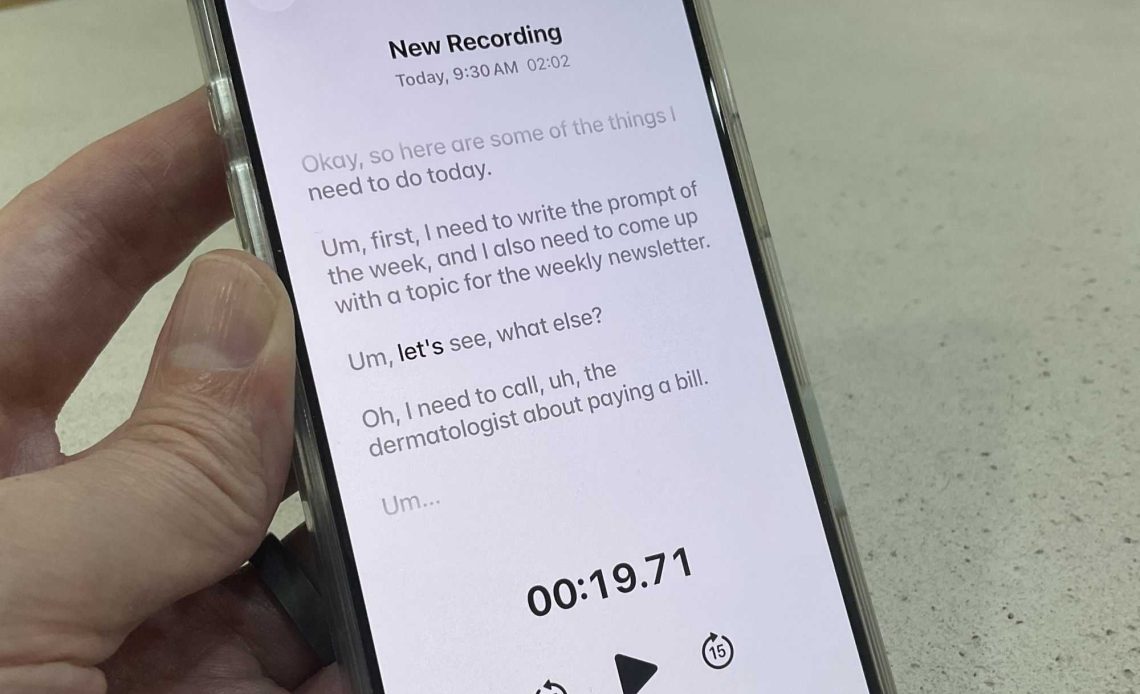
I tried the prompt using Apple Notes and all I did was talk out loud, going over every possible task I could think of. Naturally, top-of-mind stuff came first (“Um, first, I need to write the prompt of the week”), but other random to-dos popped into my head as well (“Oh, make sure to get a pepper refill because we’re running out of, uh, pepper”).
I then took the raw transcription and fed it to ChatGPT (using the GPT-5.5 Instant model). In less than a minute, my to-do list arrived:
Not bad, although I’d say picking a newsletter topic belongs in the “decisions you need to make” section (careful prompting could fix that).
Give it a try, and don’t be afraid to tweak the prompt for free-flowing brainstorm sessions. For extra credit, you could also use a connector to send your to-dos to Notion or another online workspace.
Author: Ben Patterson
Source: PCWorld
Reviewed By: Editorial Team
