



After switching to Chromium, Microsoft Edge exploded in popularity and quickly became the second-most popular desktop browser, and now, it just continues to add useful features to tempt away Chrome users. The latest addition coming to Microsoft Edge is “performance mode.”
Rolling out first to the Canary channel, “performance mode” in Microsoft Edge is designed to improve how the browser uses the resources available to it. In practice, Microsoft says the new mode will improve speed and responsiveness overall while “optimizing” the use of battery, CPU, and RAM. Apparently, the mode may adjust based on your browsing habits too.
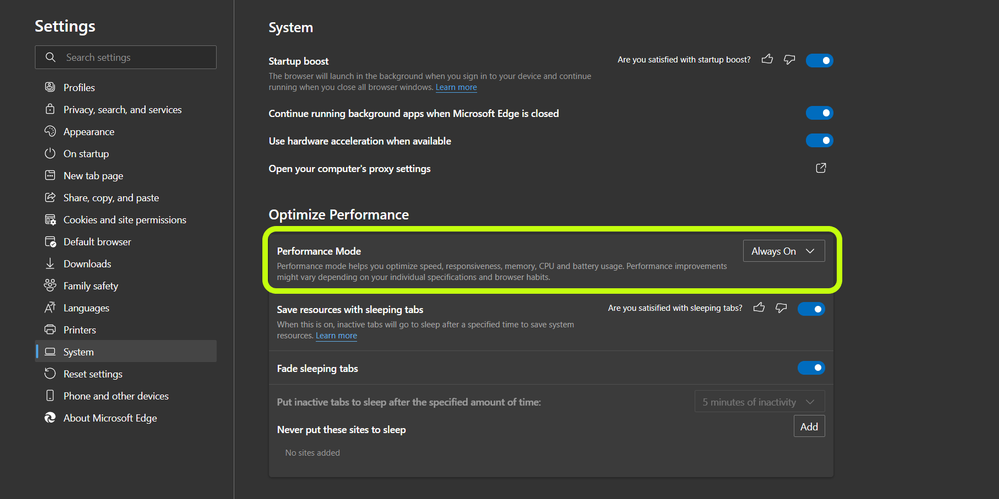
Performance mode helps you optimize speed, responsiveness, memory, CPU and battery usage. Performance improvements might vary depending on your individual specifications and browser habits.
One specific change Microsoft notes is that the “Sleeping Tabs” feature in Edge will be locked to five minutes when performance mode is turned on. “Sleeping Tabs” essentially freezes a tab that’s left open in the background, saving resources when it’s not actively being used.
Performance Mode is rolling out now in version 91.0.856.0, available in the Canary channel. The toggle is available in the “System” section of the settings menu.
More on Microsoft Edge:
- Microsoft Edge adds a handy Kids Mode in its latest move that Google Chrome should copy
- Edge will adopt the same four-week update schedule as Google Chrome
- Microsoft Edge gains password manager, Chrome-like themes, plus much more
Author: Ben Schoon
Source: 9TO5Google
