


Apple has released the iOS 27 public beta for all eligible iPhones along with the public betas of iPadOS 27, macOS 27, and others which were revealed in June at WWDC 2026 earlier last month. These betas are ideally more stable and safer for the general public to use but they aren’t free from bugs entirely. Here’s everything to know about the new public beta and how you can install it in your iPhone.
iOS 27 Public Beta: How to Install?
To install the iOS 27 Public Beta, users need to sign in to the Apple Beta Software Program website using the same Apple Account linked to their iPhone and enrol in the beta programme after accepting the terms and conditions. Once enrolled, they need to open the Settings app, navigate to General > Software Update > Beta Updates, and select the iOS 27 Public Beta. After returning to the Software Update page, the beta update will appear, allowing users to tap “Update Now” to begin the installation.
Apple recommends installing beta software on a secondary device, as pre-release software may contain bugs and stability issues. Users planning to install the beta on their primary iPhone should create a recent backup beforehand to avoid potential data loss.
iOS 27: Features
Siri AI
Apple is completely reimagining Siri with a new AI-powered experience built on Apple Intelligence. The upgraded assistant can hold more natural conversations, answer open-ended questions, brainstorm ideas, and also provide richer responses. Further, Siri can also understand personal context, that’ll help users find photos, emails, notes, and other information by just asking.
The assistant can now perform actions across apps such as Messages, Music, Reminders, and Calendar, while also pulling information from the web for more detailed responses. Apple is also introducing a dedicated Siri app that keeps conversation history synced across devices and allows users to continue chats seamlessly between iPhone, iPad, and other Apple devices.
Another notable addition is Siri Mode in the Camera app. Combined with Visual Intelligence, it can identify objects, provide contextual information, answer questions about what the camera sees, and perform actions based on visual content.
Users will also be able to customize Siri’s voice, including tone, pitch, accent, and speaking speed. However, these features will require the most advanced on-device AI models which are only supported on iPhone 17 Pro, iPhone 17 Pro Max, iPhone Air, iPad models with M4 and later and at least 12GB of unified memory, Mac models with M3 and later and at least 12GB of unified memory, and Apple Vision Pro (M5).
AI Features Arrive Across Apple Apps
Apple Intelligence is expanding throughout iOS 27. The Photos app gains new editing tools including Spatial Reframing, which can adjust a photo’s composition after it is taken, Extend for expanding image boundaries using AI, and an upgraded Clean Up tool capable of removing larger unwanted objects.
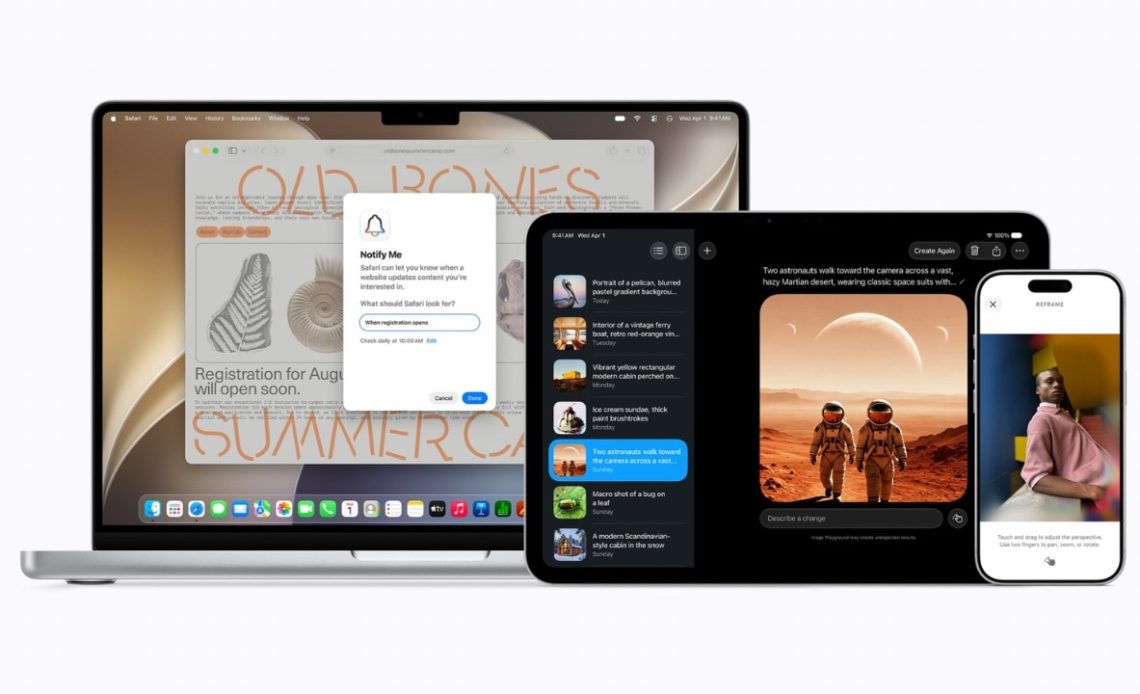
Image Playground has been upgraded with support for higher-quality image generation and new artistic styles, including photorealistic outputs. Meanwhile, Messages and Mail can now surface contextual suggestions that allow users to quickly create reminders, notes, calendar events, or perform other actions directly from conversations.
Next, Apple is also introducing Call Context, which can proactively surface relevant information while users are on a phone call, such as reservation details, booking confirmations, or even other data pulled from apps as well as emails.
Also Read: Apple Creator Studio Update Brings New AI Capabilities
Safari and Passwords Get Smarter
Safari is receiving several AI-powered upgrades, such as where Tabs can now be automatically grouped into categories, making it easier to organize browsing sessions. A new “Notify Me” feature can monitor webpages for changes such as product restocks or price drops and alert users when updates occur.
The Passwords app is also becoming more proactive. Now, it can identify weak or compromised passwords and automatically update them on a user’s behalf, which basically reduces the need for manual Password management.
Also Read: Apple Debuts Sleep Apnoea Notifications for Apple Watch, Hearing Test Feature for AirPods Pro Users in India
Natural Language Shortcuts
Apple is making automation easier with AI-powered Shortcuts. Instead of manually building workflows, users can describe what they want to happen in plain language. For example, a user will be able to create an automation that sends an ETA message to a family member whenever they leave work.
Major Child Safety Enhancements
iOS 27 introduces several new parental control features. During device setup, parents can choose which system apps their children can access. New website approval controls allow children to request permission before visiting unfamiliar sites, while parents can review and approve those requests directly through Messages.
Communication Safety has also been expanded. In addition to detecting nudity, the system can now intervene before children view graphic violence or gore in shared images and videos. Apple is also adding Time Allowances and app scheduling tools that allow parents to set category-based limits for entertainment, social media, and gaming apps.
Faster Performance Across the Board
Apple says iOS 27 includes major performance improvements. App launches are up to 30% faster, photos can load up to 70% faster in the Photos app, and AirDrop transfers are up to 80% faster. The company has also optimized networking transitions, allowing devices to switch more smoothly between Wi-Fi and cellular connections.
Mail search has been improved with a new ranking system that prioritizes the most relevant results, helping users find messages more quickly. Under the hood, Apple has also introduced optimizations such as an improved CPU scheduler to enhance overall responsiveness.
Refined Design Language
Apple is refining its Liquid Glass design system with improved readability, better contrast, and more consistent visual effects. App icons have been redesigned with sharper details, and users now get a new slider that lets them adjust the appearance of Liquid Glass, ranging from ultra-clear to fully tinted styles.
Accessibility Improvements
Accessibility receives several notable upgrades. VoiceOver gains richer image descriptions and Action Button integration, while a new captioning system can generate synchronized subtitles for videos and even translate existing captions into other languages. Magnifier also receives new tools aimed at users with low vision.
Health and Wellness Updates
The Health app now adds perimenopause and menopause support through Cycle Tracking. The feature can notify users when logged cycle patterns may indicate perimenopause and provide educational resources alongside symptom tracking tools.
Maps, Home, AirPods and More
Apple Maps gets an upgraded Flyover experience that uses aerial imagery combined with AI models to render buildings, landmarks, and even individual trees in greater detail.
The Home app gains Apple Intelligence features that can summarize HomeKit camera footage, intelligently group related notifications, and allow users to search security footage using natural language descriptions. Supported HomeKit cameras can now stream and record in 4K.
AirPods users also get a new Custom EQ feature that allows manual adjustment of bass, mids, and treble. Apple is also bringing GymKit support to iPhone as well as AirPods Pro 3, which’ll enable deeper integration with compatible gym equipment for more accurate workout metrics.
Improved iCloud Shared Albums
Shared Albums are becoming more flexible, allowing Android and Windows users to contribute photos through iCloud.com. Apple is also adding support for full-resolution sharing, reactions, and improved filtering options.
iOS 27 Public Beta: Supported Models
- iPhone 17 Pro Max
- iPhone 17 Pro
- iPhone Air
- iPhone 17
- iPhone 17e
- iPhone 16 Pro Max
- iPhone 16 Pro
- iPhone 16 Plus
- iPhone 16
- iPhone 16e
- iPhone 15 Pro Max
- iPhone 15 Pro
- iPhone 15 Plus
- iPhone 15
- iPhone 14 Pro Max
- iPhone 14 Pro
- iPhone 14 Plus
- iPhone 14
- iPhone 13 Pro Max
- iPhone 13 Pro
- iPhone 13
- iPhone 13 mini
- iPhone 12 Pro Max
- iPhone 12 Pro
- iPhone 12
- iPhone 12 mini
- iPhone 11 Pro Max
- iPhone 11 Pro
- iPhone 11
- iPhone SE (2nd generation and later)
iPadOS 27, macOS 27 Golden Gate, watchOS 27 (and more) Public Beta Versions
Apple also released the public beta versions of iPadOS 27, macOS 27, watchOS 27, visionOS 27, HomePod 27, and tvOS 27. The biggest addition in watchOS 27 is Siri AI, Apple’s next-generation assistant powered by Apple Intelligence. Siri can now hold natural conversations, understand personal context, perform actions across apps, and answer questions using information from the web. iPadOS 27 gets a lot of its features from iOS 27, like Siri AI, new CPU scheduler, and more. macOS 27 Golden Gate comes with faster performance, visual refinements to Apple’s Liquid Glass design language, Siri AI, and more.
Author: Abhishek Malhotra
Source: The Mobile Indian
Reviewed By: Editorial Team
