



Another one of the under the radar but valuable privacy changes to come with iOS 14 and iPadOS 14 is the option to mask your device’s Wi-Fi address. Read along for how to easily use a private Wi-Fi MAC address on iPhone and iPad.
Each device you use that connects to the internet has a media access control address or MAC address. In an iOS 14 privacy and security improvement, Apple is making it simple to use a private Wi-Fi MAC address with your iPhone and iPad.
The feature makes it more difficult for your device and activity to be tracked when using wireless networks and is applied on a per network basis.
Also, keep in mind that there are some issues with using a private Wi-Fi address in some school and enterprise settings.
How to use a private Wi-Fi MAC address on iPhone and iPad in iOS 14
- On your iPhone or iPad, open the Settings app
- Tap Wi-Fi
- Tap the blue “i” next to a network (one you’re already connected to or not)
- Tap the toggle next to Private Address to mask your iPhone or iPad’s Wi-Fi MAC address
- If you’re switching this on while already connected to a network, tap Disconnect to finish the process (you’ll automatically reconnect to the Wi-Fi network in a moment)
Here’s how these steps look:
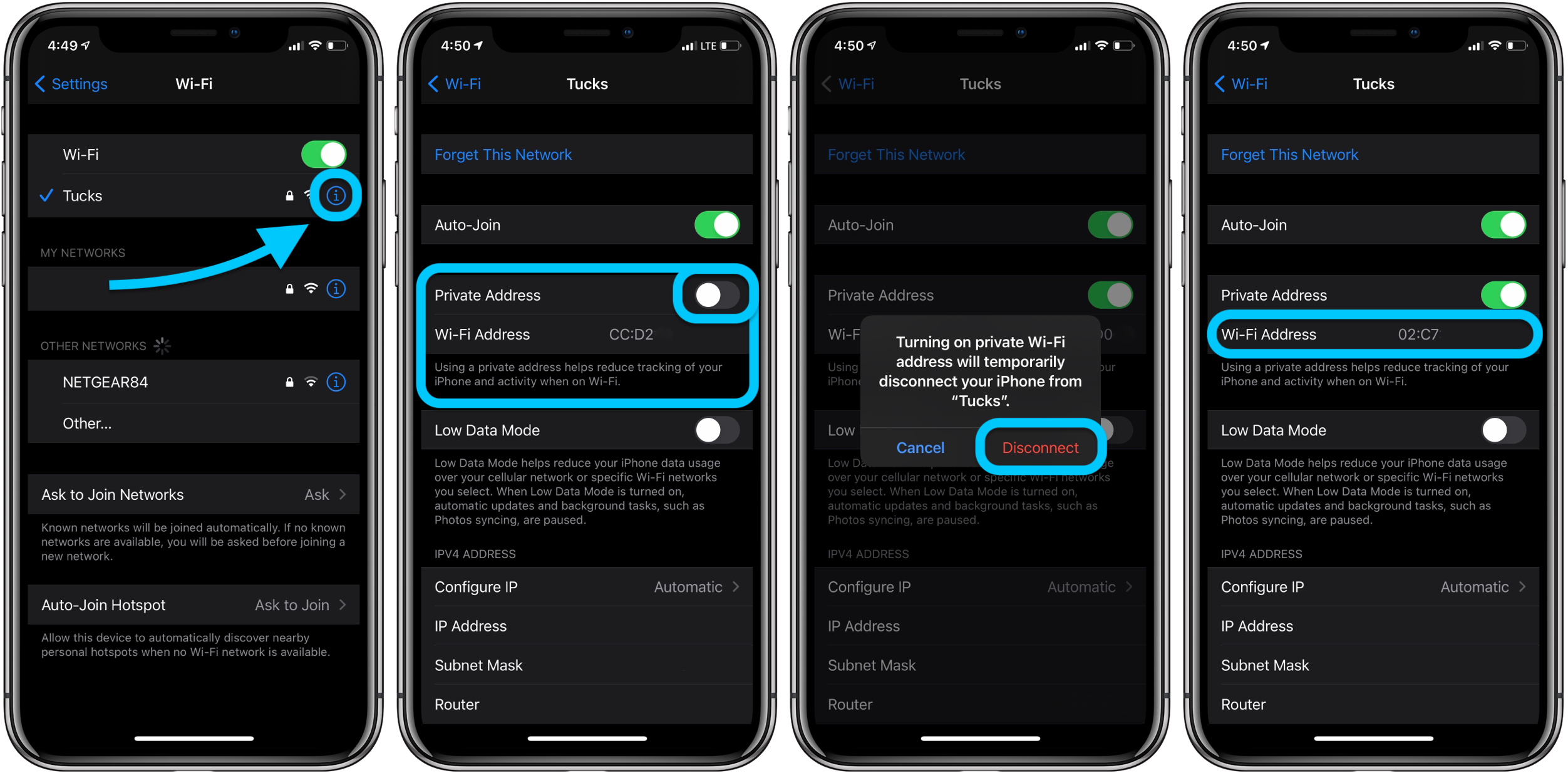
That’s it! You should now see the new private address in place of your iPhone or iPad’s actual Wi-Fi MAC address. Remember using a private Wi-Fi address works on a per network basis, so repeat as needed.
Apple notes a few tips in a support document:
- If your Wi-Fi router is configured to notify you whenever a new device joins the network, you will be notified when your device first joins with a private address.
- If a network can’t use a private address to provide parental controls or identify your device as authorized to join, you can stop using a private address with that network.
- Rarely, a network might allow you to join with a private address, but won’t allow internet access. If that happens, you can stop using a private address with that network.
- Hands-on with the top 10 iOS 14 features for iPhone [Video]
- iPadOS 14 – 50+ Top Features and Changes! [Video]
- iOS 14: Here’s how to use the new iPhone home screen widgets
- Hands-on: Widgetsmith brings ultra-customizable widgets to your iOS 14 home screen
- iOS 14: How to do Picture in Picture video multitasking on iPhone
- iOS 14: How to watch 4K YouTube videos on iPhone, iPad, and Apple TV
- iOS 14: How the compact call interface works on iPhone
Author: Michael Potuck
Source: 9TO5Mac
