



Fitbit’s wearables are an excellent choice for anyone who needs to track health stats accurately. On top of that, devices such as the Sense 2 and Versa 4 are also able to take on smartwatch features like Google Wallet’s contactless payments. This guide will go through adding Google Wallet to your Fitbit device.
What Fitbit wearables can use Google Wallet?
Fitbit’s device line focuses mainly on health tracking, opting for fitness-focused features rather than ones that you’d find in a Wear OS device. Even with that being the case, a couple of Fitbit’s health trackers have the ability to add Google Wallet.
Google Wallet allows users to add cards and make mobile payments without pulling physical cards out. In Fitbit’s line, there are only two devices that can make use of contactless payments. Those are the Versa 4 and Sense 2.
Related: Fitbit Sense 2 & Versa 4 review: In the shadow of the Pixel Watch
How to add Google Wallet to the Fitbit Versa 4 or Sense 2
Using Google Wallet on your Fitbit Versa 4 or Sense 2 is really easy, with the Fitbit app having a button to take you to an easy install.
- On your paired phone, open the Fitbit app.
- Tap your profile picture in the top left.
- Pick your Sense 2 or Versa 4.
- Tap Google Wallet.
- Note: If you don’t see the button, you may need to ensure your Fitbit device is fully up-to-date.
- Hit continue and follow the instructions.
- Note: You’ll have to set a PIN in order to add cards to Google Wallet.
- Choose the cards you want to add and follow the provided instructions.
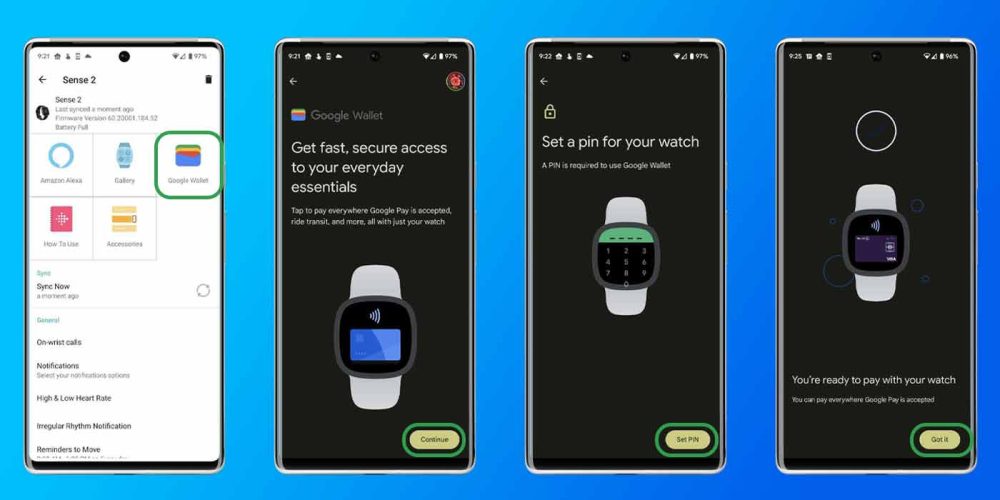
The whole process only takes a couple of minutes to complete and can be virtually painless, unless your bank makes it difficult to verify your card for Google Wallet.
Adding Google Wallet expands what the Fitbit Versa 4 and Sense 2 are capable of. With that, you’ll be able to pay at any terminal that can make use of contactless NFC payments.
Buy the Versa 4 ($70 off)
Buy the Sense 2 ($100 off)
More on Fitbit:
- Fitbit for Android rolls out Health Connect support [Update: Active]
- Fitbit Versa 4 review: the good, the bad, the ugly
- Fitbit ‘by Google’ previews what’s next from TV & smart home availability to affordability
Author: Andrew Romero
Source: 9TO5Google
