



Ready to use all the new features arriving with iOS 15 like Focus mode, Live Text, offline Siri, all-new Safari, redesigned Notifications, and more? Follow along for how to install iOS 15 on iPhone.
iOS 15 is officially available for all iPhone and iPad users after going through the beta testing process since June.
- iOS 15 and iPadOS 15 are now available; here are the best features
- Hands-on with the top iOS 15 features for iPhone [Video]
- These are the iPhone and iPod touch models compatible with iOS 15
- Should you update to iOS 15?
Notably, some of the big iOS 15 features like FaceTime SharePlay, Apple Wallet ID cards, App Privacy Report, and more.
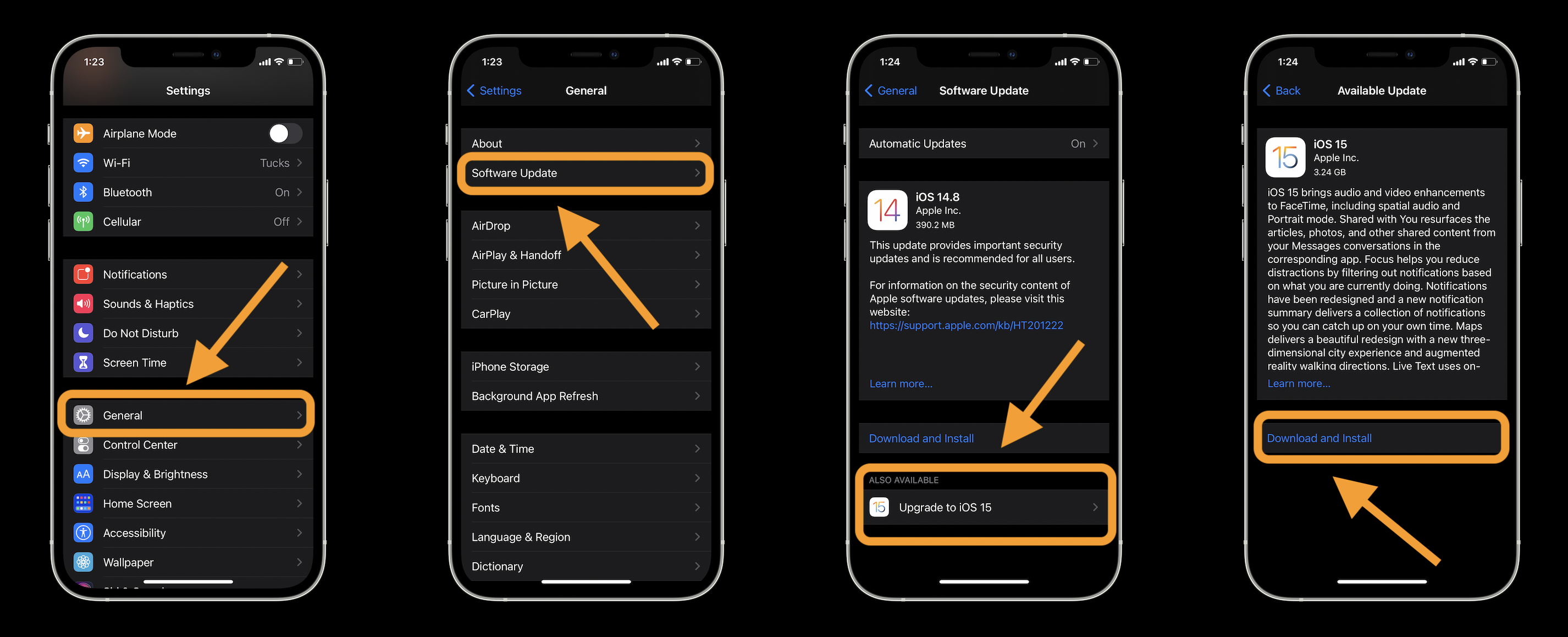
How to install iOS 15 on iPhone
- Open the Settings app on your iPhone or iPad
- Swipe down and tap General
- Choose Software Update
- Tap Download and Install under iOS 15
- If iOS 14.8 appears at the top, look at the bottom and choose Upgrade to iOS 15
- Then tap Download and Install
- Follow the prompts to finish the installation
Here’s how the process looks:
If you don’t have enough storage on your device to install iOS 15, your iPhone or iPad will ask if you’d like to automatically and temporarily remove content to do it.
- Here’s how the all-new Safari in iOS 15 works
- Hands-on: Here’s how Background Sounds work in iOS 15
- Hands-on: Here’s how iPhone’s Live Text OCR works in iOS 15
- Here’s what does and doesn’t work with offline Siri in iOS 15
Author: Michael Potuck
Source: 9TO5Google
