



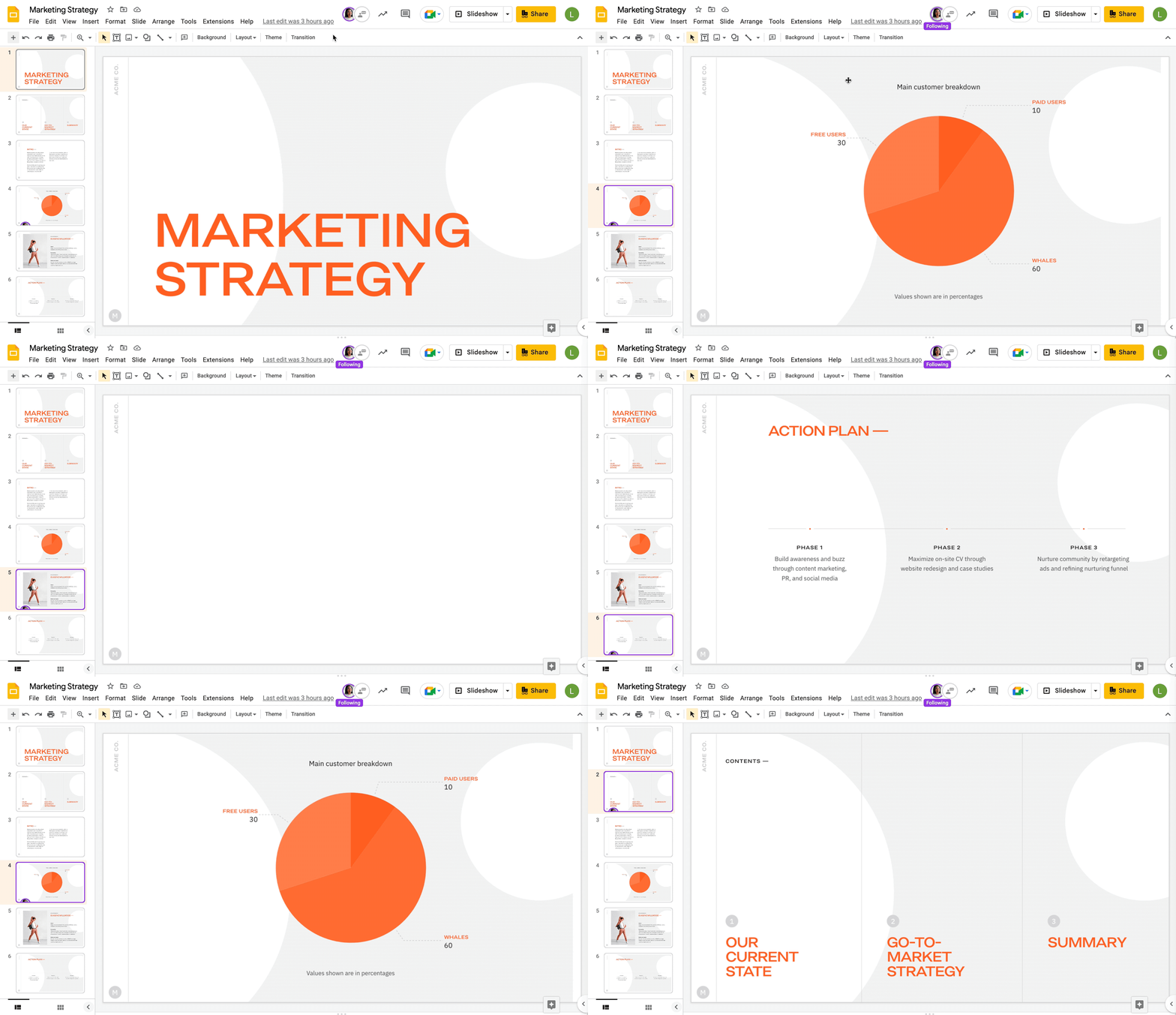
Google wants to improve the real-time editing experience in Slides with a “Follow” feature that lets you jump to whatever page a specific user is viewing.
Tapping another person’s avatar in the Google Slides top bar will let you follow and “move with them as they navigate and make changes to a presentation.”
This joins the highlight around the slide in the filmstrip view. To stop following, click on their avatar again, and the badge will disappear. Google Slides will also stop if:
- The collaborator refreshes or leaves the presentation.
- You make any edits to the presentation.
- You click a different slide.
- You enter Slideshow mode.
Following in Google Slides is currently rolling out and will be especially useful for jointly reviewing documents:
- Available to all Google Workspace customers as well as legacy G Suite Basic and Business customers.
- Available to users with personal Google Accounts.
More on Google Slides:
- Every Google app with an Android tablet UI [U: Home, Search]
- Docs, Sheets, and Slides are Google’s first apps to use the new Material You toggle
- Google’s Simple ML for Sheets add-on can predict missing and spot abnormal values
- Google Meet Companion Mode coming to mobile, Gmail client-side encryption, & more Workspace at Cloud Next 2022
Author: Abner Li
Source: 9TO5Google
