



Server-side updates are common for the Google Play Store, and currently yet another is headed to users. For some, the Google Play Store is adding a much more prominent way to check for updates.
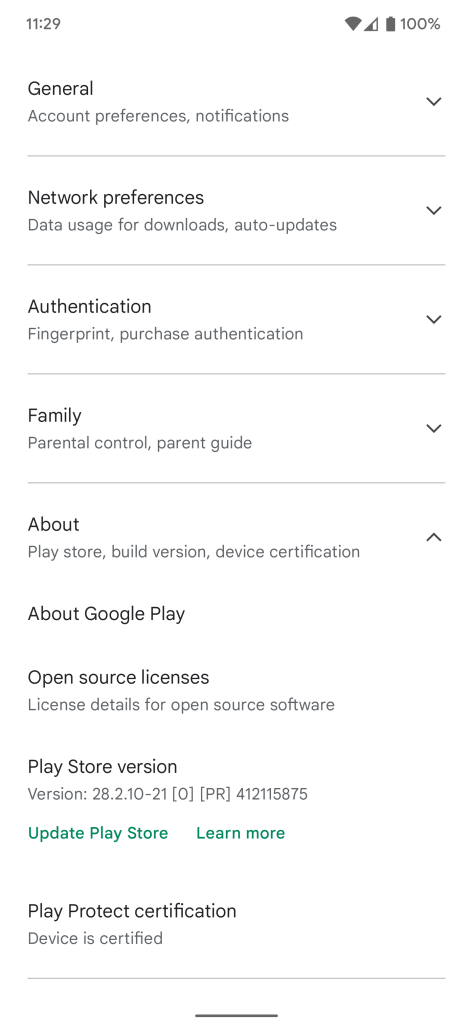
Available under Play Store > Settings > About, this new option simply builds on existing functionality. For some users, a “Update Play Store” button appears underneath the Play Store version to quickly allow users to check for an upgrade to the app marketplace easily.
Prior to this change, the Play Store did offer a method of checking for updates to its own app, but it wasn’t very intuitive. Tapping on the Store’s version number would trigger a check for updates available to the app, but because there was no clear indication of this functionality, most users weren’t aware it existed.
This more prominent button certainly makes it more obvious that users can, in fact, check for updates to the Play Store itself, but it’s not yet rolled out widely. Our Kyle Bradshaw is seeing the option on his Pixel 6 Pro, as pictured below, and we’ve had at least one other report showing that it works on Android 10 as well. Hopefully, we’ll see this option roll out more widely in the near future.
More on Play Store:
- Android TV apps can now be remotely installed from your phone via Play Store
- Google Play Store names best Android apps and games of 2021
- Google rolling out prominent ‘Offers’ tab in the Play Store for some users
Thanks Victor!
Author: Ben Schoon
Source: 9TO5Google
