


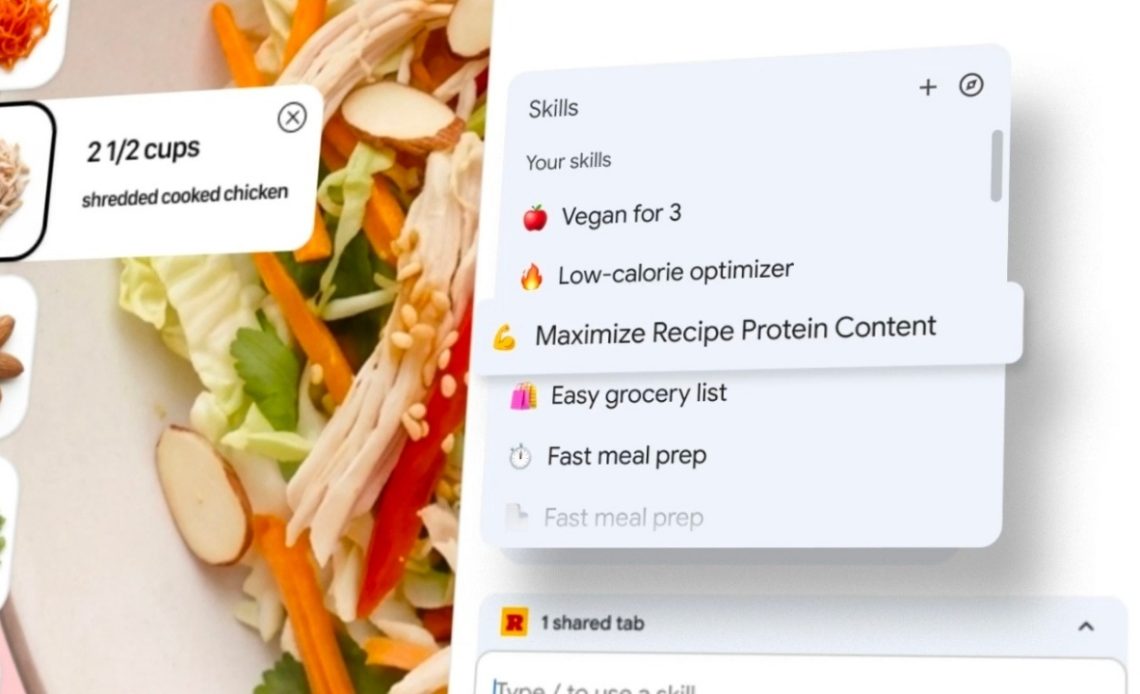
Google has announced a slew of new updates, continuing its streak of new AI announcements in the past few weeks. The new announcements include the introduction of Skills in Chrome, a new Google App for desktop, and an India-specific announcement where Personal Intelligence is now available inside the Gemini app.
Skills in Chrome
Skills in Chrome lets you save and reuse your most helpful AI prompts and run them with a single click. When you write a prompt that you’ll want to use again, you can save it as a Skill directly from your chat history. This way, you won’t have to enter the prompt again when you need it. Instead, select your saved Skill in Gemini in Chrome by typing forward slash ( / ) or clicking the plus sign ( + ) button, and your Skill will run on the page you’re viewing, along with any other tabs you select. You can edit your saved Skills and create new ones at any time. Here are a few examples of how you can use Skills in Chrome:
- Productivity: scanning lengthy documents for important information
- Health & Wellness: quickly calculating protein macros for any recipe
- Shopping: generating side-by-side spec comparisons across multiple tabs
To get started, Google has also announced a library of ready-to-use Skills for common tasks and workflows. With Google’s premade skills, you can “break down the ingredients of a product you’re viewing online,” “select the perfect gift from multiple options by cross-referencing your budget with the recipient’s interests,” and do more.
Google notes that a Skills prompt will ask for confirmation before taking certain actions, such as adding an event to your calendar or sending an email. “And Skills benefit from Chrome’s layered protections, including automated red-teaming and auto-update capabilities,” Google said.
Starting today, Google is rolling out Skills to Gemini in Chrome on Mac, Windows, and ChromeOS users who have English US set as their default Browser language. Your saved Skills are available on any signed-in Chrome desktop device and can be managed by typing forward slash ( / ) in Gemini in Chrome and then clicking the compass icon.
Also Read: Google Releases Interactive Simulations and Models in Gemini; Fitbit Personal Health Coach Arrives in India
Google App for Desktop
Google has also announced a new Google app for desktop users. With the new app for Windows, you can use a simple keyboard shortcut (Alt + Space) to launch the Google app and get quicker access to AI-powered responses and ask follow-up questions and helpful links.
With Lens and screen sharing built into the app, you can also ask about any part of your screen, whether a specific window or your entire screen. Plus, one can easily find apps and files across their computer and Google Drive-all from the Search box.
The app is available only for Windows 10+ desktop devices and currently supports English language only.
Personal Intelligence in Gemini App for India
Announced in the US back in January, Personal Intelligence in Gemini app is now available for Indian users. Personal Intelligence securely connects information from apps like Gmail and Google Photos to make Gemini uniquely helpful. If you turn it on, you control exactly which apps to link. It connects Gmail, Photos, YouTube and Search in a single tap.
Connecting your apps is off by default: you choose to turn it on, decide exactly which apps to connect, and can turn it off anytime. When enabled, Gemini accesses your data to answer your specific requests and to do things for you.
The feature does have limitations, where you may encounter inaccurate responses or “over-personalization,” where the model makes connections between unrelated topics. “Gemini may also struggle with timing or nuance, particularly regarding relationship changes, like divorces, or your various interests,” said Google.
The feature is rolling out to Google AI Plus, Pro and Ultra subscribers and will come to free users in the coming weeks. Once enabled, it works across Web, Android and iOS and with all of the models in the Gemini model picker. If you don’t see an invitation to try it on the home screen of Gemini, you can turn it on in Settings by following these instructions:
- Open Gemini and tap Settings
- Tap Personal Intelligence
- Select Connected Apps (Gmail, Photos, etc.)
Author: Abhishek Malhotra
Source: The Mobile Indian
Reviewed By: Editorial Team
