



For some, the 5G rollout hasn’t necessarily resulted in faster speeds or even a more consistent experience. In a possible acknowledgment of that, Google Fi now lets Pixel owners set their Preferred network type to LTE.
Opening the Settings app > Network & internet > SIMs/Google Fi will reveal a tappable “Preferred network type” preference that’s set to “5G (recommended)” by default. The other options in the menu are LTE and 3G. After making a selection, the indicator in the status bar should update after a few seconds.
Depending on your area’s cellular network, using LTE might result in better connectivity than 5G, or at least consistently more bars on your Google Fi Pixel.
This change appears to have been introduced, or at least widely noticed, with Android 13 QPR1 and the December security patch.

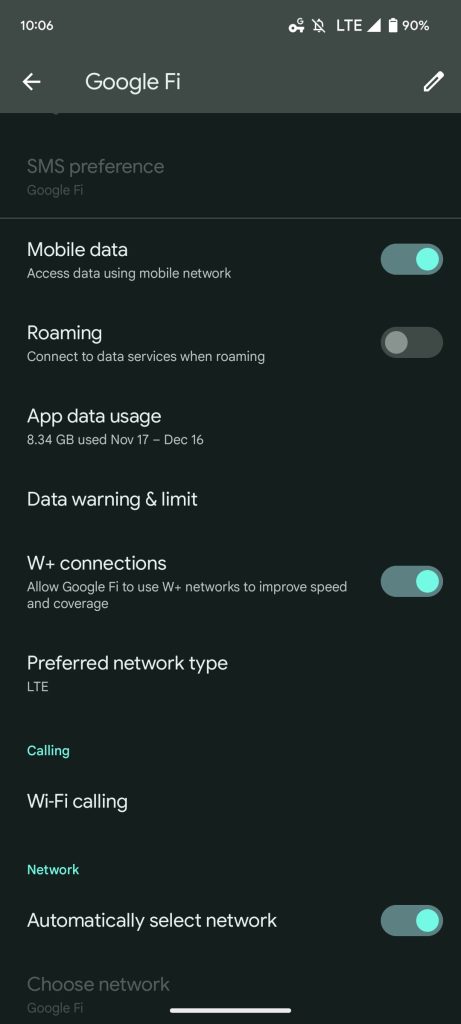
Workarounds previously existed (like booting into Safe Mode or dialer codes), but they did not persist and required changing back every so often. So far, this Preferred network type looks to stick through reboots. That’s what people are currently noticing, and it survived a restart on our Pixel 7.
Hopefully, this was an intentional change on Google Fi’s part after previously not allowing Pixel devices to officially alter the Preferred network type.
More on Google Fi:
- Google Fi Unlimited Plus adds 1-year of YouTube Premium, existing subscribers eligible
- New Fi ‘Virtual Carrier Network’ on Pixel keeps cellular data anonymous from Google, MVNO partners
- Google Fi expands coverage with ‘W+ network’ of high-speed Wi-Fi that counts against data cap
Author: Abner Li
Source: 9TO5Google
