



Google Drive already allows users to customize the color of folders that appear in “My Drive,” but that capability is now being extended to shared drives and shortcuts.
Shared drives empower teams and organizations to store, access, and collaborate on files. Shortcuts are pointers to files that are stored in another folder or in another drive, which make it easy to surface content without creating copies of files.
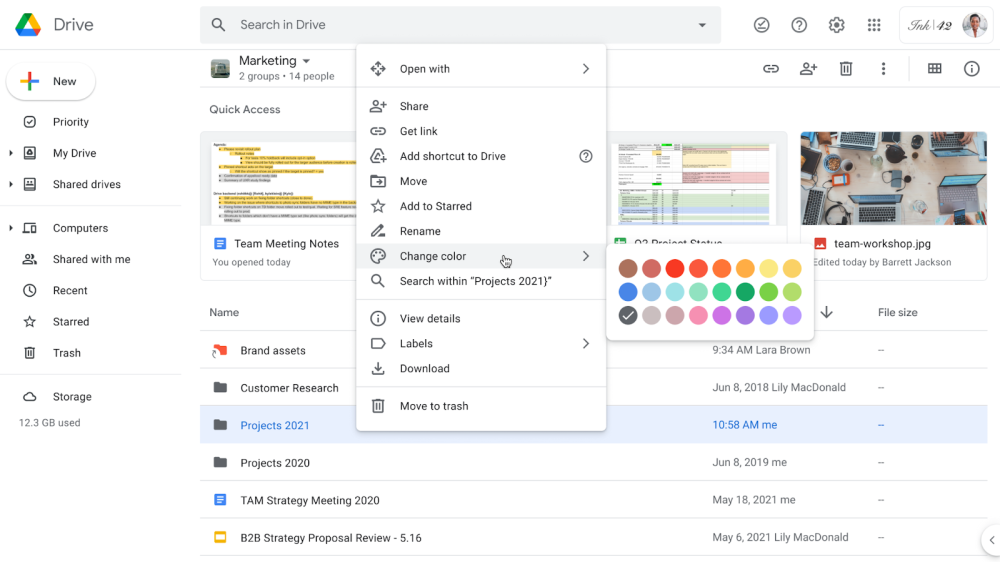
Right-clicking (or long-pressing) shows “Change color” in the subsequent menu that appears. Like before, 24 colors are available and help visually organize Google Drive. These custom folder colors are only visible to you.
For example, you can assign colors to your most important folders, making it easier to quickly navigate to them in Drive.
Color coding for all Google Drive folders is rolling out now on Android, iOS, and the web. It will be fully available for all Workspace and personal users in the coming weeks.
More about Google Drive:
- Google will soon let you block Drive users that share spam
- Google Drive adding new and updating current search operators
- Drive for Android getting a more prominent notifications feed
- Google showing ‘we protect your privacy’ banner in Gmail, Drive, and Photos
- ‘Google Drive for desktop’ replacing Backup and Sync in 2021, add Google Photos upload
Author: Abner Li
Source: 9TO5Google
