



In addition to a web revamp, Google Chat is rolling out more notification settings over the coming weeks. These new options are “based on your level of engagement or involvement in specific conversations.”
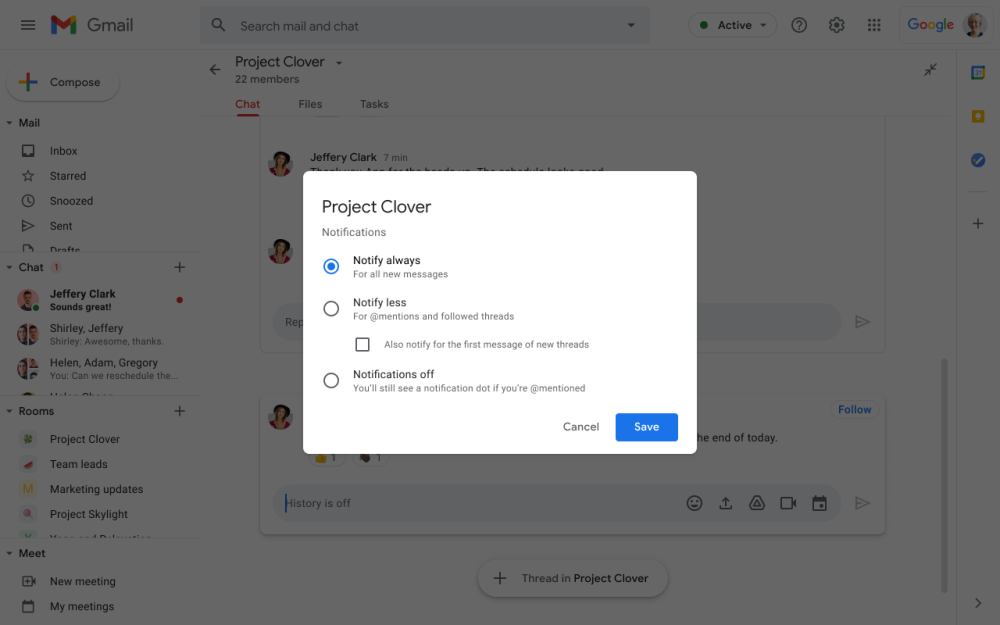
From the three-dot overflow menu in each room, users can open a new Notifications page:
- Notify always: You’ll receive a notification for every message and new messages will be badged.
- Notify less: You’ll receive notifications and badges for direct mentions, @all mentions, and followed threads. Additionally, there is an option to be notified about new threads in threaded rooms.
- Notifications off: You will receive no notifications, but you’ll see a badge if you’re directly mentioned.
Today, you can only “Turn off notifications,” which still alerts you about @mentions. These settings apply to push notifications (and badges) across the Chat desktop and mobile, as well as Gmail, clients. At launch, existing rooms will see notifications “default to a state where you receive more notifications.”
We hope that by giving the ability you adjust your notifications as needed, you can stay on top of need-to-know conversations without being overwhelmed by notifications.
These additional Google Chat notification settings are rolling out from today and will be fully available in the coming days for all Workspace customers.
More about Google Chat:
- Google Chat web redesign is also coming to Workspace accounts
- Google will suggest 1:1 Chat conversations based on your Calendar events
- Chat’s old Electron desktop app shutting down this month in favor of PWA
- Google widely rolling out Chat ‘early preview’ to replace classic Hangouts
Author: Abner Li
Source: 9TO5Google
