


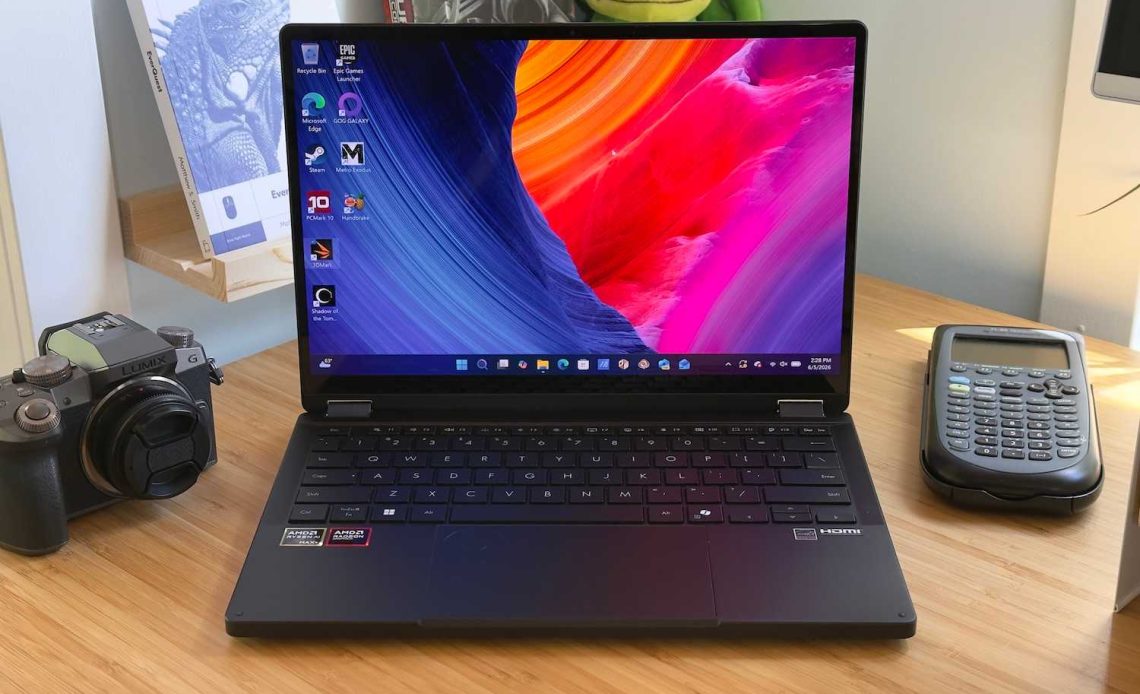
Creative professionals looking to buy a laptop in 2026 are at once spoiled for choice and lacking in options. Many excellent laptops exist, but the sudden increase in RAM pricing has booted many configurations with 32GB of RAM above $2,000. The Asus ProArt PX13 manages to limbo below that price point with only a few compromises, and that makes it a good value pick.
The Asus ProArt PX13 is arguably an entry-level machine for creative professionals. It opts for a variant of AMD’s Ryzen AI MAX+ with only eight CPU cores, though the Radeon 8060S integrated GPU is the same as in other variants of the chip. Asus equips the laptop with 32GB of RAM, but skimps a bit on the solid state drive, which provides just 512GB of storage. That keeps the price tag down to a more modest $1,899.99, which isn’t inexpensive but toward the low end of pricing for this caliber of hardware.
The ProArt PX13 comes in two other configurations, both of which are a lot more expensive. The mid-range $2,799.99 configuration upgrades the AMD Ryzen chip to an AI MAX+ 395 with 16 CPU cores and also doubles the RAM and storage to 64GB and 1TB. Shoppers with a lot to spend can snag the high-end configuration for $2,999.99 and enjoy a RAM upgrade to 128GB, though all other specifications remain the same.
The past few years have seen Asus finally land on a new design language—or, rather, languages, as the look of its laptops varies depending on the family. In the case of the ProArt PX13, like other ProArt laptops, that means a simple and professional look with a deep black colorway.
It’s not the most exciting look at a glance, but the details are in Asus’ favor. I like the ridged design touch on the display hinge, the deep black hue of the laptop’s material, and the rigidity of the chassis. It feels like a premium machine worthy of its premium pricing.
The ProArt PX13 has a touchscreen and the hinge allows rotation back 180 degrees, which means the laptop is actually a 2-in-1. With that said, the 2-in-1 function feels like a bonus instead of a headline feature. The PX13’s slab-sided design isn’t all that comfortable to hold as a tablet, and while it’s reasonably portable at 3.06 pounds and 0.7 inches thick, it’s too heavy to hold for long periods of time. The model I reviewed also didn’t ship with a stylus, though according to Asus’ website for the laptop, some more expensive configurations include it.
A spacious keyboard spans most of the ProArt PX13’s width. The keys are large, yet also have good separation between them. Key feel is good with plenty of key travel and a taut action. I did notice, however, that the middle of the keyboard allows a fair bit of keyboard flex. It doesn’t ruin the experience—it’s not even particularly noticeable in normal use—but it struck me as odd given how rigid and premium the rest of the laptop feels.
Keyboard backlighting is standard and offers three levels of brightness. The brightness of the backlight is fairly high even at the dimmest settings, and it may seem overly bright if you use the laptop in a nearly pitch-black room. On the other hand, there’s no disputing the visibility. I could even see the backlight when using the laptop outside.
The touchpad measures roughly 5 inches wide and 3 inches deep, which is a respectable size for a 13-inch laptop and offers enough room for most multi-touch gestures, though users with large hands might still find scrolling a bit cramped.
The touchpad includes a virtual scroll wheel called the DialPad that works like a physical dial control. It can be customized for a variety of functions, like zooming in and out of photos in an editing app, or scrolling a timeline in a video editor. While a true physical control is of course a better tactile experience, the DialPad is a fine substitute for laptop users who don’t want to carry extra peripherals.
All current Asus ProArt PX13 models have the same display. It’s a 13.3-inch OLED touchscreen with 2880×1800 resolution, a 16:10 aspect ratio, a 60Hz refresh rate, and HDR support with a quoted maximum of 400 nits.
It’s mostly an excellent display. OLED is known for providing a wide, vivid color gamut, and excellent contrast. The ProArt PX13’s display does that and also delivers superb sharpness thanks to its pixel density of 255 pixels per inch. For comparison, that’s sharper than even a 27-inch 5K display, which provides about 217 pixels per inch.
There are two downsides to mention. The first is the 60Hz refresh rate. That’s fine for a lot of creative work, of course, but 120Hz displays are so common in 2026 that any premium laptop stuck at 60Hz feels a bit disappointing. Also, while the ProArt PX13 does support HDR, its brightness isn’t enough to make it pop. Asus reserves its brightest OLED displays for the ProArt P16/P14 and PZ14 models.
Even so, it’s a great display for SDR, and I particularly like its sharpness. A 2880×1800 OLED panel isn’t novel—a lot of premium laptops provide it—but the ProArt PX13 model I reviewed is towards the lower end of the price bracket where I’d expect to see it.
The Asus ProArt PX13 has built-in speakers, though Asus doesn’t say all that much about them in its marketing. Their performance is likely the reason for that. They’re not awful—the maximum volume is high and they’re fairly clear at lower volumes—but the audio presentation can become extremely muddy at or close to maximum volume. The listening experience is harsh and metallic. Headphones or external speakers are recommended.
A 1080p webcam and dual array microphone are found above the Asus ProArt PX13’s display, and they provide typical performance. Video quality is sharp in bright rooms but grainy in darker settings. The default camera field-of-view is wide, so you may want to zoom in the camera, which reduces the effective resolution. Audio recording is clear and loud but has the hollow and distant sound that is the hallmark of laptop microphones.
Biometric login is supported through Windows Hello. It works well in a variety of camera conditions. A fingerprint reader is not available.
Connectivity is always important for creative professionals, and fortunately the Asus ProArt PX13 makes a strong showing here.
While it lacks Thunderbolt (as is common for an AMD-powered laptop), the ProArt PX13 does include two USB-C ports with 40Gbps of data. Those ports can also carry a DisplayPort video connection and power, though they don’t provide enough to fully power the laptop under load.
Additional connectivity includes a USB-A port with 10Gbps of data, a 3.5mm audio jack, and a MicroSD 4.0 card reader. Ethernet is not included, though that ship has pretty much sailed. Very few laptops in this size category provide it.
While overall physical connectivity is good, the placement of the ports is towards the middle and front of the machine. That will make cable management a hassle and can leave you with cords dangling off your lap in more awkward locations. This compromise is a result of the laptop’s substantial cooling system, which includes a vent on each flank.
Wireless connectivity is solid, too, as the laptop supports Wi-Fi 7 and Bluetooth 5.4.
Asus provides several ProArt PX13 configurations. More expensive models feature the AMD Ryzen AI MAX+ 395, but the more affordable model I reviewed boasts the Ryzen AI MAX+ 388. This CPU cuts the core count in half (from 16 to eight), but retains the Radeon 8060S integrated GPU. Removing half the CPU cores is sure to have an impact on multi-threaded CPU performance—but is it really a serious drawback?
The ProArt PX13 gets off to a decent start in PCMark 10 with a score of 8,129. That is technically the second-lowest of the laptops used for comparison, but the results across four of the five choices are very close, and a score around 8,000 or above is excellent in any scenario.
Cinebench 2024 is a modern multi-threaded workload that tends to make excellent use of all threads. Here we do see a weakness in the ProArt PX13, which is the slowest of the group by a fair margin.
This shows the downside of the Ryzen AI MAX+ 388, which has only eight CPU cores. That’s half as many as most other Ryzen AI MAX+ chips, which have 16 cores. The Ryzen AI MAX+ 392 in the Asus TUF Gaming A14, by the way, is an in-between option with 12 cores.
Handbrake is also a heavily multi-threaded test, but we run an older version, and it scales across cores a bit differently than the more modern Cinebench 2024. Once again the ProArt PX13 is towards the lower end of the performance spectrum, but the gaps are smaller, and the ProArt PX13 is actually able to keep up with the Razer Blade 14 with Ryzen AI 9 365.
Now we move on to 3D benchmarks, which shifts attention away from the CPU cores and to the integrated Radeon 8060S GPU. The Ryzen AI MAX+ 388 doesn’t cut back the Radeon 8060S at all—indeed, that’s basically AMD’s entire pitch for the chip. It provides a high level of iGPU performance without extra CPU cores, which might not be necessary for 3D workloads.
At first glance, it looks like it works. There’s not much difference between the Asus ProArt PX13 and the Asus TUF Gaming A14 here.
Moving on to Shadow of the Tomb Raider, however, a gap begins to appear. The Asus TUF Gaming A14 starts to run far ahead of the ProArt PX13, and the Nvidia-powered machines seriously break away from the Radeon 8060S laptops.
It’s a similar story in Metro Exodus, which we test at 1080p and Extreme preset, but without ray-tracing enabled. There’s a small but noticeable gap between the ProArt PX13 and its gaming-focused cousin. The Nvidia RTX 5070 laptops, meanwhile, are much quicker overall.
Wrapping up with Cyberpunk 2077, the narrative is largely the same, though here the ProArt PX13 and TUF Gaming 14 are nearly tied. The game is definitely playable, but most people will want to reduce the image quality for enhanced performance.
While the ProArt PX13’s graphics performance might seem a bit weak overall, its size and weight must be kept in mind. It weighs just a hair over three pounds and ships with a 200 watt power adapter. The larger TUF Gaming A14 only weighs a quarter of a pound more, but ships with a much larger and heavier 240 watt power adapter.
The Asus ProArt PX13 ships with a 73 watt-hour battery, which is either huge or small, depending on how you think about it. It’s a big battery for a 13-inch laptop, but not all that large for one trying to deliver high performance.
This does lead to moderate battery life, though once again, it’s a matter of perspective. The laptop can last over eight hours in PC World’s standard battery test, which loops a 4K file of the short film Tears of Steel. That’s not a lot for a small and portable laptop, but it’s not bad for a laptop that offers strong graphics performance.
While the ProArt PX13 does have enough juice in the tank for about a full work day—if you use the battery conservatively—it’s still a laptop you’ll usually need to connect to a charger when it’s not in use. This stands in contrast to a laptop like the Dell XPS 14, which provides less performance overall but can last up to twice as long on a charge.
The Asus ProArt PX13 is a solid option if you want a high-performance laptop in a compact form factor. Its 13-inch touchscreen, rotating hinge, and slim profile make it a versatile travel machine. Asus also deserves props for giving the laptop a strong design identity and packing it with connectivity.
A few trade-offs are made to achieve these perks. The ProArt PX13’s performance is good, but not incredible, and its CPU performance is arguably weak when compared to other laptops that target creative professionals. Battery life is also modest.
Fortunately, Asus has a good excuse. The laptop is priced at $1,899.99 at BestBuy with 32GB of RAM and a 512GB solid state drive. Today, in 2026, with a RAM crisis pushing pricing up across the board, this is an extremely competitive price. You can find faster laptops, to be sure, but odds are you’ll pay a lot more for them.
Author: Matthew S. Smith
Source: PCWorld
Reviewed By: Editorial Team
