


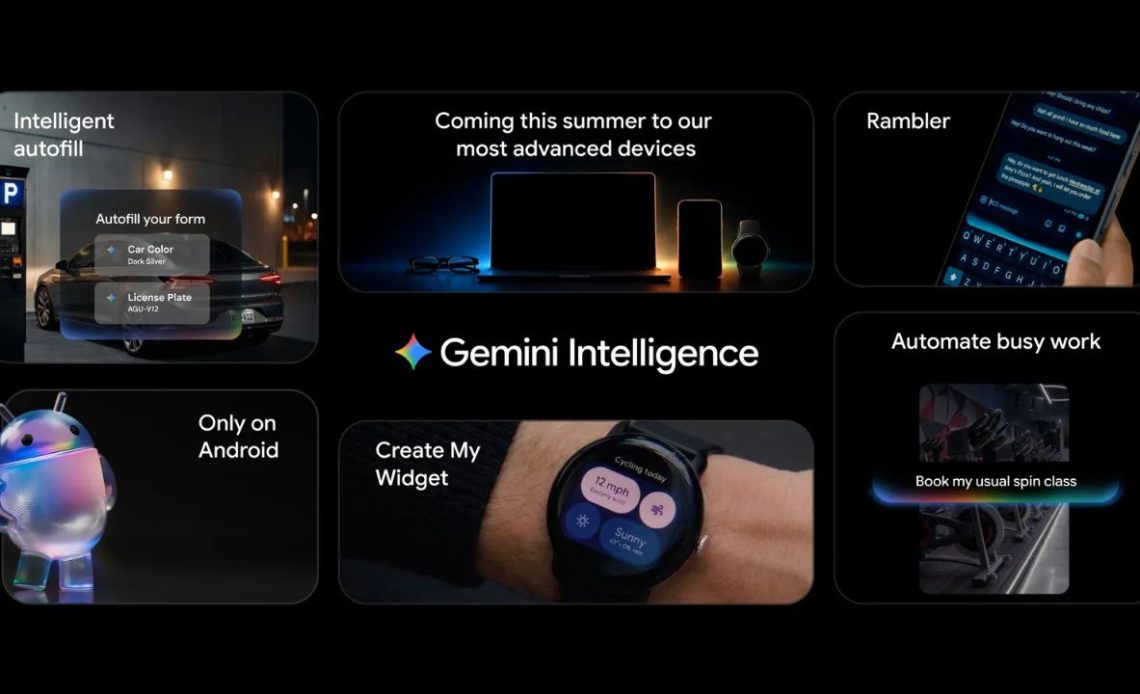
Google, at its Android Show I/O Edition 2026 held on May 12, made a bunch of announcements regarding what’s new in Android 17. The company announced Gemini Intelligence, which aims to “transform Android into an intelligence system that can do so much more for you, taking your intention into action.” Here are all the announcements Google shared at the Android Show.
Gemini Intelligence
Gemini Intelligence is described by Google as a new set of AI-powered features designed to automate everyday tasks across Android devices. The company says the experience has been heavily optimised for devices such as the Galaxy S26 and Pixel 10, particularly for food delivery and rideshare apps.
According to Google, Gemini Intelligence will be able to handle multi-step actions automatically. This could include tasks like booking a preferred bike slot for a spin class, finding a syllabus inside Gmail, and adding required books to a shopping cart without users manually switching between apps.
The system further also uses screen and image context to simplify actions. For example, users can long-press the power button while viewing a grocery list and ask Gemini to create a delivery cart using the listed items. Similarly, users can take a photo of a travel brochure and ask Gemini to find similar tour packages online. Google says users will be able to track these actions live through notifications while Gemini works in the background.
The company notes that Gemini only performs actions after receiving direct commands from users and stops once the requested task is completed.
Google is also bringing Gemini deeper into Chrome on Android starting later this month. Gemini in Chrome will help users research, compare information, summarise web pages, and even automate actions such as appointment bookings or reserving parking spots.
Autofill on Android is also getting an AI upgrade, where the company says Autofill with Google will soon use Gemini’s Personal Intelligence features to fill out more complex forms using information pulled from connected apps. The company notes that this feature will remain completely opt-in, and users can disable it at any time.
Another addition is a new Gboard feature called Rambler. The tool is designed to convert natural speech into cleaner and more polished text. Google says Rambler can automatically remove filler words, repetitions, and speech pauses while preserving the meaning and tone of the message. The feature also supports multilingual speech input, allowing users to switch between languages naturally within the same sentence. Google says audio used for transcription is processed in real time and is not stored.
Gemini Intelligence will also introduce “Create My Widget,” a feature that lets users generate custom widgets using natural language prompts. Users can create widgets tailored to specific needs, such as meal prep suggestions or weather updates focused only on wind speed and rainfall.
Google says the new Gemini-powered experience is paired with an updated design language built on Material 3 Expressive. The refreshed interface is designed to reduce distractions and make interactions feel more focused and responsive.
Gemini Intelligence features will roll out in waves starting with the latest Samsung Galaxy and Google Pixel phones this summer, and will become available across your Android devices, including your watch, car, glasses, and laptops, later this year.
Googlebook
Googlebook is being described as a result of the mix of the best of both worlds: Android and ChromeOS. Googlebooks are the first laptops designed from the ground up for Gemini Intelligence to deliver personal and proactive help when and where you need it, says Google.
Google has added a new feature called Magic Pointer, developed in collaboration with the Google DeepMind team. The feature integrates Gemini directly into the cursor experience. Users can basically wiggle the cursor to trigger contextual AI suggestions based on what is currently visible on screen.
Google says Magic Pointer can recognise actions and objects on the display and suggest relevant shortcuts or tasks. For example, hovering over a date in an email could prompt users to create a calendar event, while selecting two images could generate a combined visual preview instantly.
The company is also bringing its “Create Your Widget” feature to Googlebook devices. The tool allows users to generate personalised widgets through natural language prompts. Gemini can pull information from the web or connected Google services, such as Gmail and Calendar, to create custom dashboards.
Google says the platform is built on parts of the Android tech stack, which allows faster rollout of features and tighter integration between phones and laptops. The company is positioning Googlebook as a more connected multi-device experience, allowing users to move between devices without interrupting workflows.
For example, users will be able to quickly access mobile apps while working on their laptops or respond to reminders from apps such as Duolingo without fully switching devices. Google is also introducing a Quick Access feature that lets users browse, search, and insert files stored on their phones directly from the laptop’s file manager without manual transfers.
On the hardware side, Google confirmed partnerships with Acer, ASUS, Dell, HP, and Lenovo for the first wave of Googlebook laptops. Intel has also separately confirmed that it has partnered with Google for Googlebook, suggesting the laptop will have chips from Intel. Google says all Googlebook devices will include a signature “glowbar” design element that will visually distinguish them from traditional laptops.
The company says more details about Googlebook devices will be shared closer to their launch later this fall.
New AI Features in Chrome for Android
Google has announced a new set of AI-powered features for Chrome on Android, bringing Gemini-based assistance, image customisation tools, and automated browsing actions directly to mobile devices.
The company says the upcoming features are powered by Gemini 3.1 and are designed to make browsing on Android more interactive and productivity-focused.
One of the biggest additions is Gemini in Chrome, which acts as a built-in AI browsing assistant. Users will be able to tap the Gemini icon in the Chrome toolbar to open an assistant panel at the bottom of the screen. From there, Gemini can answer questions about the current webpage, summarise articles, explain complex topics, or provide contextual information without requiring users to leave the page.
Google says Gemini in Chrome will also integrate with other Google services to handle tasks directly from webpages. For example, users can add events to Google Calendar, save recipe ingredients to Google Keep, or search Gmail for related information while browsing.
The company notes that users who opt into Personal Intelligence features can receive more personalised suggestions based on their interests, hobbies, family details, and browsing habits.
Chrome on Android is also gaining support for Nano Banana, Google’s AI-powered image generation and editing system. The feature will allow users to create visual content or modify images found on the web directly inside the browser. Google shared examples such as converting a webpage into an infographic for easier studying or virtually furnishing a room in an apartment listing by asking the AI assistant to add furniture and décor elements.
Another major addition is auto browse, which introduces task automation inside Chrome on Android. The feature is designed to complete repetitive tasks automatically using contextual information from webpages and connected services. For instance, Chrome could use event details from a ticket confirmation to help users reserve parking through SpotHero, or automatically modify recurring online orders such as pet food subscriptions.
Google says auto browse will always ask for confirmation before completing sensitive actions like purchases or social media posts.
The company also highlighted that the new AI features include the same security protections available on desktop Chrome, including safeguards against prompt injection attacks and malicious AI manipulation attempts.
Gemini in Chrome is expected to roll out to select Android devices running Android 12 or newer in the US starting at the end of June. Meanwhile, auto browse will be available for AI Pro and Ultra subscribers in the U.S. with select devices running Android 12 or higher.
Redesigned Android Auto Experience
Google first reiterated that Cars with Google built in, now available in more than 100 models from 16 brands, are getting new and improved apps, including a more deeply integrated Gemini and Google Maps.
Then, it shared that an updated Android Auto interface based on Material 3 Expressive design elements from Android phones will be coming to car displays. Google says the new UI includes updated fonts, smoother animations, wallpapers, and layouts designed to adapt across different screen shapes and sizes, including ultrawide, circular, and custom dashboard displays.
Widgets are also coming to Android Auto, allowing users to view information at a glance while navigating. Drivers will further be able to add shortcuts for contacts, weather information, garage door controls, and other quick-access tools directly on the dashboard.
One of the biggest changes is the introduction of Immersive Navigation in Google Maps, which Google describes as its biggest Maps update in over a decade. The updated experience adds a more detailed 3D navigation view with buildings, terrain, overpasses, lane markings, traffic lights, and stop signs to make navigation clearer during complicated turns and merges.
Google is also expanding entertainment features in parked vehicles. Android Auto will soon support full HD video playback at 60fps for apps such as YouTube in compatible cars. The feature will roll out later this year to select models from BMW, Ford, Genesis, Hyundai, Kia, Mahindra, Mercedes-Benz, Renault, Škoda, Tata, and Volvo.
The company says videos will transition automatically to audio-only playback once the vehicle starts moving, allowing users to continue listening to content such as podcasts safely while driving.
Spatial audio support through Dolby Atmos is also coming to supported apps and vehicles, with brands including BMW, Genesis, Mahindra, Mercedes-Benz, Renault, Škoda, Tata, and Volvo listed for initial support. Google is additionally updating media apps like Spotify and YouTube Music with redesigned interfaces that are aimed at improving usability inside vehicles.
Gemini is also becoming more deeply integrated into Android Auto as well. Google says Gemini is now widely available in Android Auto and will gain additional “Gemini Intelligence” features later this year on supported smartphones.
These features will allow the assistant to understand context across apps and automate tasks more intelligently. For example, Google demonstrated a feature called Magic Cue, which can recognise when a user receives a message asking for an address, retrieve the relevant information from messages, emails, or calendar entries, and suggest a reply automatically.
Google also confirmed that Gemini will support in-car ordering through services such as DoorDash. Users will be able to place food orders using Voice commands while driving, with only a final confirmation tap required.
Cars with Google built-in are also receiving several upgrades. Alongside support for video apps and enhanced media experiences, Google says Zoom and other meeting apps are coming later this year.
Gemini in Google built-in vehicles will also be able to answer car-specific questions, such as explaining dashboard warning indicators or checking whether large items will fit inside the vehicle’s trunk.
Google Maps on supported Google built-in vehicles will additionally gain live lane guidance using the car’s front-facing camera. The feature can analyse the road in real time, identify the driver’s current lane, and provide more accurate lane change and exit guidance.
These updates will come to Android Auto and cars with Google built-in throughout the year.
New features for creators in Android 17
Google also shared that it will be rolling out “new features for creators on Android 17, including an optimized Instagram experience, advanced editing tools and Adobe Premiere.”
One of the upcoming additions is Screen Reactions, a feature that lets users record themselves and their screen simultaneously without needing separate apps or green-screen setups. The feature is made for reaction videos and commentary content, allowing creators to overlay their live reactions directly onto videos, social posts, or other on-screen content. Google says Screen Reactions will first roll out to Pixel devices later this summer.
Google is also working closely with Meta to improve the Instagram experience on Android flagship devices. The collaboration brings support for Ultra HDR capture and playback, enabling more vibrant photos and videos paired with improved colour reproduction.
Android devices will also gain built-in video stabilisation enhancements for smoother clips while moving, along with deeper Night Sight integration to improve low-light photography inside Instagram.
The company says it has additionally optimised the entire capture-to-upload pipeline to maintain better image and video quality when content is posted to Instagram. According to Google, recent tests using the Universal Video Quality (UVQ) model showed that videos captured and uploaded from Android flagship devices performed as well as, or better than, competing platforms.
Instagram is also now fully optimised for Android tablets, allowing creators to make better use of larger screens for editing and browsing content.
Meta’s Edits App on Android is receiving new AI-powered editing tools as well. One of the additions is Smart Enhance, which can upscale photos and videos with a single tap using on-device AI processing. Another feature called Sound Separation can automatically isolate different audio layers in videos. This allows users to reduce unwanted background noise, wind sounds, or interruptions while keeping vocals and important audio clearer.
Google also confirmed that Adobe Premiere will soon launch on Android. The app will include templates and effects specifically designed for creating YouTube Shorts and social media content directly from mobile devices.
For professional creators, Google highlighted APV (Advanced Professional Video), a new video format co-developed with Samsung. The company says APV is designed to deliver high-quality video while using storage more efficiently. The format is currently supported on devices such as the Samsung Galaxy S26 Ultra and vivo X300 Ultra, powered by the Snapdragon 8 Elite Gen 5 platform, with support expected to expand to more flagship phones later this year.
QR Code File Sharing with iOS, Revamped iOS-to-Android Migration
Google notes how Quick Share already works with Apple’s AirDrop on supported Android phones. Further, it shared that support is also expected to roll out later this year for phones from Samsung, OPPO, OnePlus, Vivo, Xiaomi, and HONOR.
For users without compatible devices, Quick Share can now generate a QR code that allows files to be shared instantly with iPhones and other devices through the cloud. Google says this feature is starting to roll out to all Android devices and should become widely available over the next month.
The company also confirmed that Quick Share support will soon expand into third-party apps, including WhatsApp.
Google is additionally improving the process of switching from iPhone to Android. The company says it has worked with Apple to redesign the migration experience so users can transfer data more easily when moving to a new Android phone.
The updated transfer process supports wireless migration of passwords, photos, messages, contacts, apps, and even home screen layouts. Google also says eSIM transfers will also be supported as part of the process.
The upgraded iPhone-to-Android migration system will first roll out on Samsung Galaxy and Google Pixel devices later this year.
Pause Point and 3D Emojis in Android
Pause Point in Android comes as an alternative to existing wellbeing features in the operating system, such as App Timers and complete lockouts. When you open a distracting app, Pause Point gives you a 10-second breather to ask, “Why am I here?” During that pause, you can do a short breathing exercise or set a timer so you don’t spend too much time scrolling.
Pause Point also makes sure to stop you and think before disabling the feature by requiring a phone restart to turn it off.
Google is also introducing 3D emojis in Android, which it calls Noto 3D. “These 3D emojis bring a touch of physicality to these moments and help you overcome this digital divide. It’s the difference between a message received and a presence felt. Noto 3D will be available across Google, starting with Pixel phones, later this year,” said Google.
New Security and Privacy Features in Android
Google has detailed a wide range of new security and privacy upgrades coming with Android 17.
One of the biggest additions is verified financial calls, a new anti-scam feature designed to stop spoofed banking calls. Google says Android will work with participating banking apps to verify whether an incoming call is genuinely coming from a financial institution. If the system detects that a call is being spoofed, Android can automatically end the call before the user answers. Banks can also flag certain phone numbers as inbound-only, meaning Android will automatically block outgoing-style calls from those numbers. The feature is rolling out first on Android 11 and newer devices with support from Revolut, Itaú, and Nubank.
Google is also expanding Live Threat Detection, its on-device AI-powered app security system. Android will now warn users about suspicious app behaviour such as SMS forwarding, hidden overlays using accessibility permissions, or apps attempting to hide their icons and launch silently in the background. Android 17 will additionally introduce dynamic signal monitoring as well, allowing the system to analyse app behaviour patterns in real time to detect emerging threats faster.
Chrome on Android is getting stronger APK download protection also. If Safe Browsing is enabled, Chrome will scan APK files for known malware before users download them.
Google is also enhancing Advanced Protection, its high-security mode designed for users at greater risk of scams or targeted attacks. Android 17 will restrict accessibility access for non-accessibility apps, disable Chrome WebGPU support, and add scam detection for chat notifications. Enterprise support for Advanced Protection is also coming later this year.
Then, Android 17 improves the “Mark as lost” feature in Find Hub by adding biometric authentication requirements even after a device passcode is entered. Once a device is marked as lost, Android will also hide Quick Settings and disable new Wi-Fi or Bluetooth connections.
Google says theft protections such as Remote Lock and Theft Detection Lock will now be enabled by default on all new Android 17 devices, as well as devices upgraded or reset with the latest OS. These protections are also expanding to Android 10 and newer devices in countries including Argentina, Chile, Colombia, Mexico, and the UK.
Android 17 is additionally making brute-force attacks more difficult by reducing the number of PIN and Password attempts allowed and increasing wait times between failed attempts. Google is also adding easier IMEI access from the lock screen to help with device recovery through carriers or law enforcement.
Privacy upgrades include a new temporary location sharing button that grants precise location access only while an app is actively open. A new location indicator, similar to microphone and camera indicators, will also show users when their location is being accessed.
Google is also introducing a redesigned contact picker system that lets apps request access only to specific contacts instead of an entire address book. Developers can also request access only to certain fields, with permissions remaining temporary.
On the AI side, Android 17 introduces AISeal with pKVM, which creates a hardware-backed secure environment for processing AI-related data. Google says this is part of its broader effort to improve privacy protections for Gemini Intelligence features.
Google is also adding Android OS verification to help users confirm whether their devices are running official Android software. Launching first on Pixel devices, the feature will notify users if the operating system build is legitimate. The company is additionally introducing a public cryptographic ledger that can verify whether Google apps and services installed on Android devices are authentic releases from Google.
Other security upgrades include automatic hiding of one-time passwords from most apps for three hours after arrival to prevent OTP theft, expanded controls for disabling 2G connectivity, and the introduction of post-quantum cryptography protections.
Author: Abhishek Malhotra
Source: The Mobile Indian
Reviewed By: Editorial Team
