


The fast and frantic nature of street photography often requires you to think fast on your feet, or rather fingers. Whether it’s a moment that you want to flood the sensor with light to achieve a pin-sharp shot, or you want to slow the shutter down a little to inject a bit of arty motion – diving into the settings in the conventional way, changing from aperture priority to shutter priority, can be a long enough delay that leads to you missing the moment.
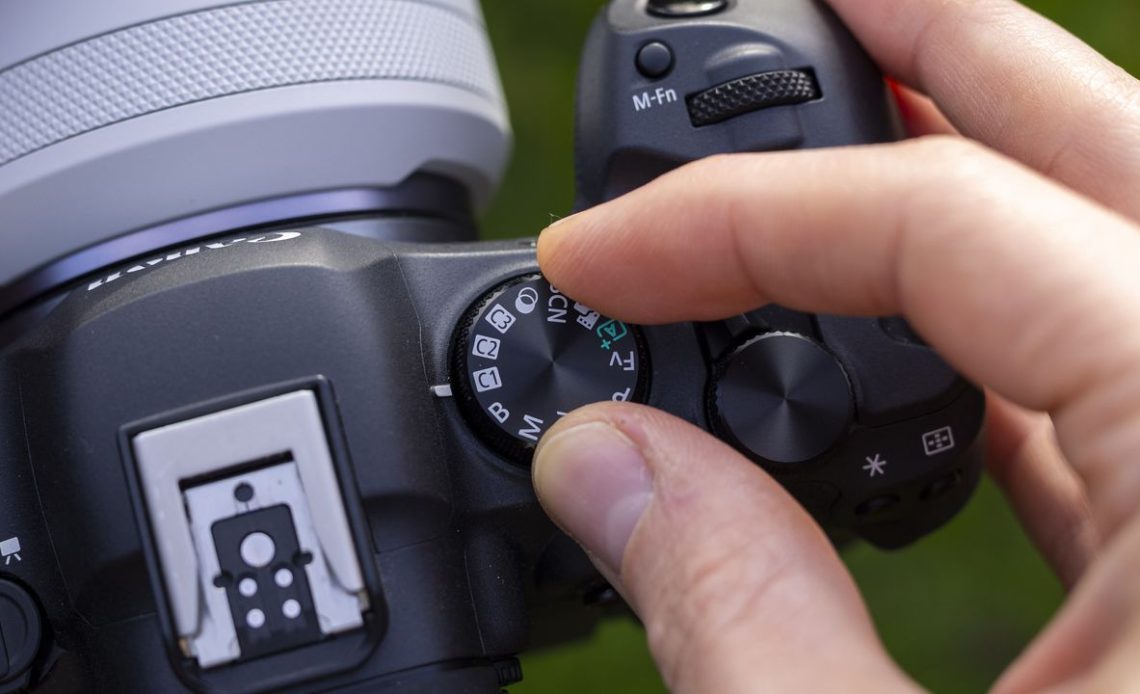
One of my favorite solutions to this problem is to set up custom modes. Most cameras from enthusiast-level upwards have some sort of custom mode functionality, usually labelled as C1, C2, C3 etc. It’s even better if these are physically printed on the mode dial as it means you can dive into them with a quick turn of the dial.
On my Canon EOS R5 this is done by going into the mode you want to use, such as Aperture Priority, Shutter Priority, Program, Manual or even Canon’s Flexible Priority and then dialling in the settings you wish to use.
Let’s say I would like this to be a setting I can quickly activate when I need to freeze the action fast. So I could set this to Aperture priority with a very wide aperture, I could even enable Auto ISO to tell the camera not to let the shutter speed go below a certain speed. Once done, I head over to the Spanner icon in the Menu and choose Custom Shooting Mode (C1-C3) and then choose whether I want to save this preset to C1, C2 or C3.


Now, let’s say I would like another batch of settings to be available within easy reach for those times when I want a slower shutter speed, but still fast enough to shoot handheld with – useful for panning or capturing the rush of movement in busy cities from people rushing past or cars whizzing by. For this, I may instead dive into my Canon’s Shutter Priority mode (Tv on the mode dial) and set the shutter speed to 1/30sec with an ISO of 200. I can then go back into the Custom Modes menu and dedicate this to the C2 mode.
Now, with the flick of the Mode Dial I can go between C1 and C2 easily without diving into settings, and I can decide whether I want to freeze the action or go for artistic movement.
Of course, modern cameras usually have all sorts of customization options available, and it’s worth setting yours up so that everything feels natural and quickly set up for you. I have a function button near the shutter button on my Canon EOS R5 and Canon’s RF lenses also have a Control Ring, both of these can be set up to quickly change settings like Exposure Compensation or ISO, depending on what works best for you, so if you have these features on your camera I would whole-heartedly recommend you try them out as they cost absolutely nothing and can make a big difference to the way you take your photos.
Author: Dan Mold
Source: DigitalCameraWorld
Reviewed By: Editorial Team
