


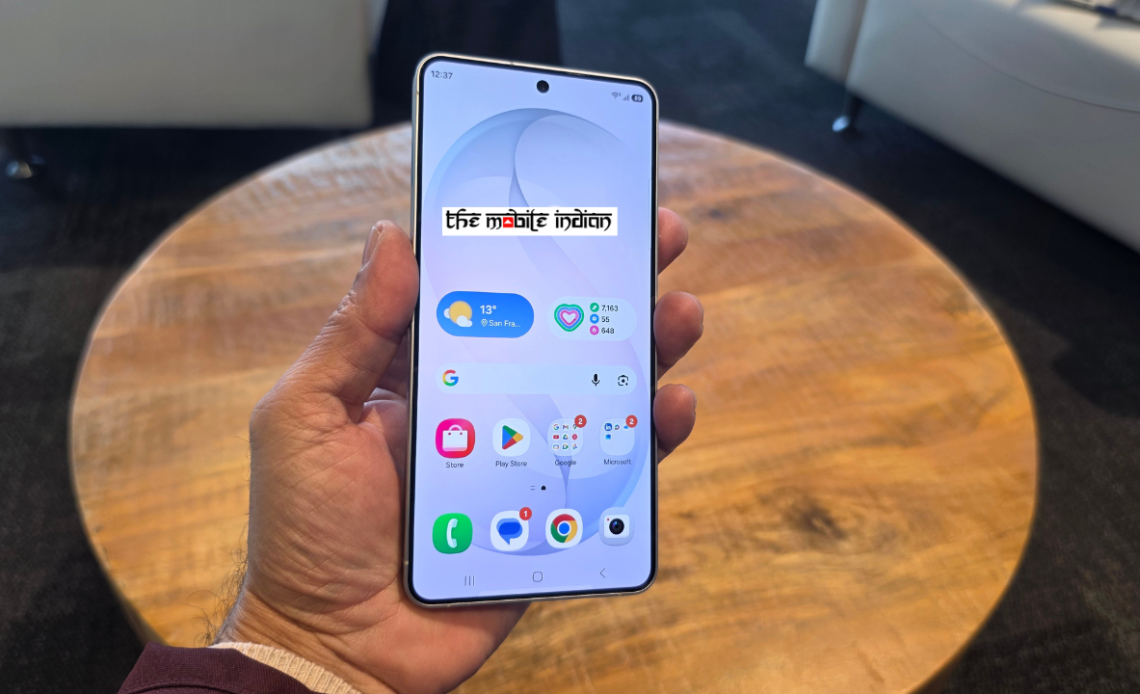
Samsung Electronics launched the Galaxy S26, S26+ and S26 Ultra at its Galaxy Unpacked event in San Francisco, positioning the new line-up as its most AI-driven smartphones yet.
At first glance, the S26 series seems to be more of an evolution than a revolution.
The overall design language remains close to last year’s Galaxy S25 range. Except for the standout visual change, a return to a more prominent, raised rectangular camera island with rounded corners. The Ultra variant, in particular, looks similar to its predecessor, with slightly rounder corners to improve in-hand comfort. The device feels refined and polished, but evolutionary. In everyday use, it is comparable in footprint and handling to the previous model.
Samsung is framing the S26 series as a solid step forward, built around AI enhancements, performance improvements and privacy-focused upgrades rather than a radical redesign.
Galaxy S26 Ultra: Privacy Display Takes Centre Stage
The Galaxy S26 Ultra remains the flagship of the range with a 6.9-inch QHD+ Dynamic AMOLED 2X display and a 5,000 mAh battery. The most visible hardware addition is the built-in Privacy Display, a feature designed to limit side-angle viewing without requiring an external screen protector.

The screen dims when viewed at an angle, but stays bright and clear when looked at head-on. This function can be adjusted in the settings, giving users the option to enable full privacy or just partial privacy for select apps.
Samsung says the solution works at the Pixel level rather than through a stick-on filter.
Outdoor visibility is quite good and is supported by an anti-reflective coating. PWM dimming operates at around 480Hz, a specification that may benefit users sensitive to display flicker. Animations and scrolling appear smooth, with no visible lag during early hands-on sessions.
The Ultra is powered by the Snapdragon 8 Elite Gen 5 for Galaxy processor. Samsung claims improvements in CPU, GPU and NPU performance, with AI workloads handled more efficiently. Our early tests showed no major heating issues. The device runs One UI 8.5 based on Android 16, with fast App launches and stable multitasking.
The 200MP main camera is paired with a 50MP ultra-wide and dual telephoto setup. Samsung is emphasising AI-assisted editing, improved low-light capture and support for a new APV video codec aimed at advanced creators.

The S Pen is included, as expected on the Ultra. However, it continues without Bluetooth functionality, similar to last year’s approach. Due to the more rounded corners, inserting the stylus can occasionally feel less intuitive, particularly if placed in the wrong orientation.
Galaxy S26+: Bigger Display, Familiar AI Features
The Samsung Galaxy S26+ is up next. It boasts a 6.7-inch QHD+ screen, complete with a 120Hz adaptive refresh rate. It shares the same design direction as the Ultra, including the rounded edges and flat display profile.

Depending on the market, it is powered by either the Snapdragon 8 Elite Gen 5 for Galaxy or Samsung’s Exynos 2600 chipset. In India, it will be powered by the Exynos chipset. It offers 12GB RAM and up to 512GB storage, backed by a 4,900 mAh battery with 45W wired charging.
The triple-camera system includes a 50MP main sensor, 12MP ultra-wide and 10MP telephoto lens with 3x optical zoom. While it does not include the Privacy Display, it retains the same Galaxy AI features across search, photo editing and task automation.
Galaxy S26: Compact Flagship with Full Software Experience
The standard Galaxy S26 offers a 6.3-inch FHD+ display and a 4,300 mAh battery. It maintains the same design identity and runs One UI 8.5 on Android 16.

The camera system mirrors the S26+, with a 50MP Wide-Angle sensor, a 12MP ultra-wide-angle unit, and a 10MP telephoto unit. Charging supports up to 55% in about 30 minutes using a 25W adapter.
Although positioned as the entry point into the series, the S26 includes the same core Galaxy AI tools, including contextual suggestions, document scanning and AI-assisted editing.
AI Agents, Editing Tools and Software Safeguards Expand Galaxy’s Scope
Beyond hardware refinements, the Galaxy S26 series broadens Samsung’s AI strategy by integrating conversational agents and editing tools more deeply.
An upgraded Bixby now operates as a more capable conversational device agent. Users can navigate menus, adjust settings and execute commands using natural language, without relying on fixed keywords. In early demonstrations, device control felt direct, with fewer steps required to access system features.
Alongside Bixby, Samsung has integrated multiple AI agents, including Gemini and Perplexity. Once configured, users can trigger actions through voice prompts or a single button press. The system supports multi-step task handling in the background. For instance, booking a taxi through Gemini involves asking, reviewing trip details and confirming – without switching between multiple apps manually. Samsung positions this as a shift toward more agent-driven AI that anticipates intent rather than simply responding to isolated commands.

Photo and content editing are also receiving a similar AI-driven expansion. The upgraded Photo Assist suite allows users to describe edits in plain language. Scenes can be adjusted from day to night, objects can be added or reconstructed, and elements such as clothing details can be modified.
Creative Studio brings these tools together in one place. Beginning with a sketch, a text prompt, or even a photo, users can create stickers, invitations, or wallpapers without jumping between different apps. The whole thing stays inside the system’s interface, making it easier for anyone to make content.
Routine document handling has also been streamlined. The built-in Document Scan tool removes distortions, shadows and background distractions during scanning. Multiple images can be automatically compiled into a single PDF file, simplifying receipt storage, form digitisation, and note archiving.
Samsung has also expanded software-based protections. AI-driven Call Screening lets you know who’s calling and what they want before you pick up. Privacy Alerts keep an eye on apps with special permissions, alerting you if they’re accessing sensitive data like your location, contacts, or call history without a good reason.
Private Album, tucked away in the Gallery app, offers a straightforward way to conceal chosen photos and videos. No need for separate folders or account logins. Samsung is also improved its security. They’ve expanded their post-quantum cryptography protections, now covering a broader spectrum of system processes. This encompasses software verification and firmware security, all woven into their current security architecture.
Together, these updates underscore Samsung’s broader direction for the Galaxy S26 series: incremental hardware changes combined with expanded AI capabilities, editing tools, and background security features designed to operate without constant user intervention.
Author: Sandeep Budki
Source: The Mobile Indian
Reviewed By: Editorial Team
