


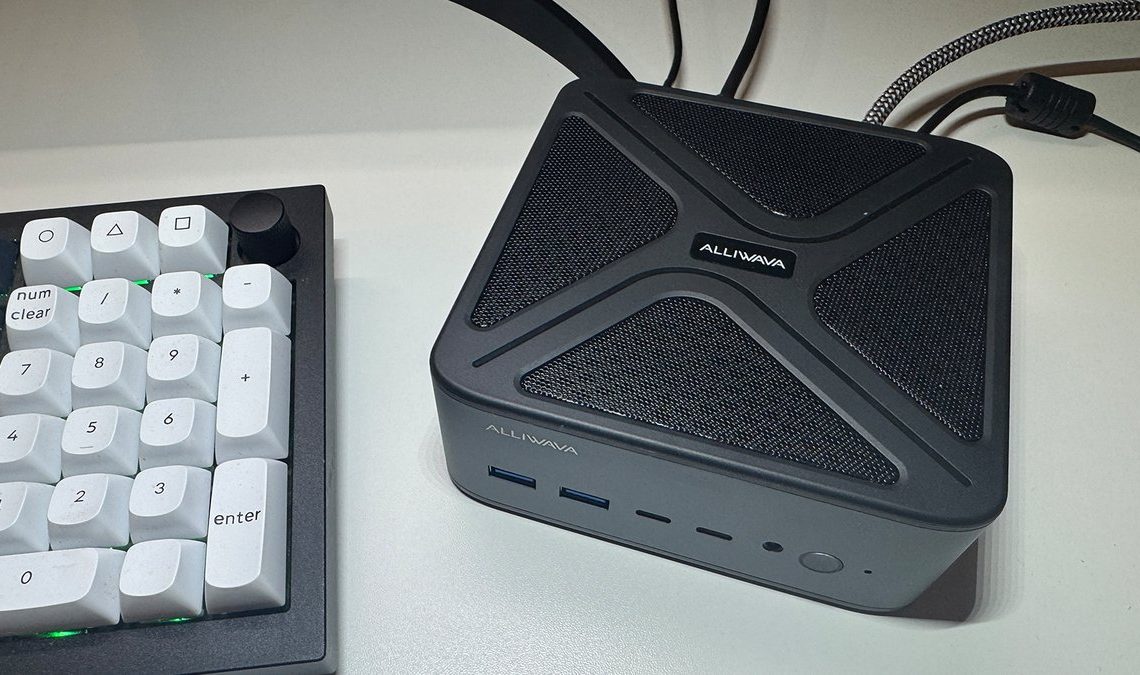
The Alliwava GH8 aims to provide powerful notebook hardware in a compact mini PC case. It uses the latest high-end AMD Ryzen 9 8945HS processor from AMD’s Hawk Point series, which is specially designed for performance-oriented, space-saving systems. Does the Alliwava GH8 prove itself in our test, compared to similar devices?
The Alliwava GH8 dispenses with large plastic elements and instead features a metal case with integrated mesh grilles. This choice of material primarily serves passive heat dissipation and gives the device a technical, functional aesthetic. The build quality is impressive, with precise gap dimensions and mechanically resilient sockets.
With compact dimensions of 13 × 12.7 × 5.2 centimeters (L × W × H) and a weight of around 580 grams, the GH8 is less bulky overall than, for example, the models from Geekom (A7 Max and A9 Max) and Miniforum’s AI X1 Pro. It should fit easily on any desk, in the living room or in the home office. Thanks to the included VESA mount, it can also be mounted on the back of a monitor to save space.
A key focus of the GH8 is its cooling design. Compared to earlier models such as the H90 Pro, Alliwava has visibly revamped the design. It features an efficient cooling design with large heat dissipation and an optimized dual fan system.
The side ventilation grilles support even air circulation, which is particularly relevant during prolonged CPU and GPU loads. In noise-reduced operating modes, the system remains pleasantly quiet at around 35dB. This makes it significantly quieter than older, less thermally efficient mini PC generations.
The processor is the AMD Ryzen 9 8945HS (Hawk Point), a further development of the 7940HS used in the Geekom A7 Max, for example. With 8 cores and 16 threads at up to 5.2 GHz, the system covers demanding multitasking and content creation scenarios.
The integrated Ryzen AI NPU is optimized for local AI processes such as image filters, audio noise reduction and on-device language models. Graphically, the GH8 relies on the Radeon 780M (12 CUs), which enables Full HD gaming at moderate quality settings and is thus expected to outperform the Intel competition in terms of frame stability. Our benchmark results below show whether this is indeed the case.
Three performance profiles between 25 and 45 watts can be selected via the UEFI BIOS. This allows users to choose between maximum performance and quiet operation.
The processor is flanked by a whopping 32GB of DDR5 RAM (manufacturer: Micron) with a clock speed of 5,600 MT/s.
One critical point is the installed 1 TB NVMe SSD: measurements of 3,572 MB/s (read) and 2,029 MB/s (write) confirm a PCIe 3.0 standard connection, which falls short of the system’s capabilities. On the positive side, however, is the second free M.2 slot, which allows memory expansion up to 4 TB.
The variety of connections is impressive for a device of this size. The interfaces for direct access are located on the front, with the USB4 port in Type-C format being particularly noteworthy from a technical point of view. This operates with a bandwidth of up to 40 Gbit/s and supports PCIe tunnelling. This makes the port not only suitable for transferring large amounts of data, but also for video output or connecting external graphics cards (eGPU). The front is complemented by two USB 3.2 Gen 2 Type-A ports, which provide a data transfer rate of 10 Gbit/s.
The rear of the case is designed for permanent cabling. Here, two additional USB 3.2 Gen 2 Type-A ports are available, which are also specified at 10 Gbit/s. For devices with lower data throughput, such as keyboards, mice or printers, two additional USB 2.0 ports are available.
This separation according to USB standards allows the processor’s fast data lines to be kept free for high-performance storage solutions, while the slower interfaces take care of the basic peripherals. In combination with the dedicated video outputs, this USB configuration allows multiple screens to be operated and integrated into complex working environments.
Together with HDMI 2.1 and DisplayPort 2.1, up to four screens can be controlled simultaneously with 4K resolution at 60 Hz. This makes the GH8 a good choice for professional multi-monitor setups.
On the network side, the compact computer boasts two 2.5 Gbit/s LAN ports. This also makes it interesting for special applications such as soft routing or as a responsive media server in the home network. WiFi 6 and Bluetooth 5.2 round off the modern connectivity package.
The Alliwava GH8 comes with Windows 11 Pro pre-installed, which is activated with a local user account. On our test device, the operating system was Windows 11 25H2 Build 26200. Therefore, you may need to update when necessary after setup. We downloaded and installed various drivers via Windows Update, as well as the AMD drivers for the Radeon graphics card and the chipset.
Although we are not looking at Windows 11 Pro in isolation, the synergy between the operating system and the GH8’s hardware is a decisive factor. The architecture of the Ryzen 9 8945HS is tailor-made for the modern Windows environment, as the system accelerates the new AI functions natively and efficiently in many areas.
Instead of burdening the CPU cores with background tasks such as Windows Studio effects (background blur or eye contact correction in video calls), the system delegates these processes directly to the NPU (Neural Processing Unit). This not only ensures a smoother user experience, but also conserves the thermal reserves of the mini PC. The seamless integration is also evident in the automatic allocation of AI workloads within Creative Cloud or local Copilot applications, underscoring the GH8’s role as a future-proof AI workstation.
With the AMD Ryzen 9 8945HS, the Alliwava GH8 positions itself as a powerful representative of the current mini PC upper class. It delivers a balanced result in benchmarks in terms of computing power, graphics performance and memory throughput. The installed processor is based on the Zen 4 architecture (“Hawk Point”) and integrates the Radeon 780M graphics unit. This puts it in the same performance range as demanding compact workstations.
Compared to the newer Zen 5 generation, as found in the Sapphire Edge AI 370, for example, the 8945HS built into the GH8 offers an already established platform that has been supplemented by an optimized NPU for AI calculations. In combination with 32GB of DDR5 RAM and a PCIe 4.0 SSD, the result is a system that not only handles classic office and productivity tasks, but is also designed to be stable for computationally intensive applications such as multitasking scenarios and local AI workloads. The hardware configuration is designed to make efficient use of the thermal capacities of the compact chassis.
We determined the desktop computing power using the PCMark 10 benchmark test. The software gives us realistic values by processing everyday tasks one after the other.
The benchmark sub-sections Essentials (9,814 points) and Productivity (9,066 points) show that everyday tasks, office work or multitasking run practically without delay on the GH8. The Digital Content Creation score of 7,810 points is somewhat weaker, leaving the mini PC almost 3,000 points behind the AMD Ryzen AI 9 HX 370 and even 4,000 points behind the Geekom IT15 with Intel Core Ultra 9.
In 3DMark’s CPU profile, the GH8 underscores its versatility: with 6,284 points at maximum threads and 956 points in the single-thread test, it achieves scores on par with the mobile Ryzen 9 8945HS. However, this places it around 20 percent below the AMD Ryzen AI 9 HX 370 in the market environment. Nevertheless, the multithread scaling shows that even demanding computing operations or parallel AI processes are handled stably.
The Time Spy score of 2,573 points is dramatically lower than the 4,244 points achieved by the IT15 with Intel Core Ultra 9 285H. The CPU points (10,150), on the other hand, are in the upper performance segment, which pays off in simulations, renderings or AI tasks.
The results in benchmarks such as Steel Nomad (375 points) and Solar Bay (9,826 points) confirm that the GH8 translates its theoretical nominal performance into measurable results in 3D and ray tracing scenarios. These values illustrate the potential of the Radeon 780M within the Zen 4 architecture. The system delivers stable performance, especially with modern graphics interfaces.
The Geekbench AI Pro values (2,941 single precision / 6,831 quantised) indicate solid AI acceleration, which is particularly relevant for on-device AI applications, edge computing or local LLM inference. Here, the GH8 even outperforms the AMD Ryzen AI 9 HX 370.
Less convincing is the SSD performance in Crystal Disk Mark: with 3,572 MB/s read and 2,029 MB/s write, the data storage is comparatively slow. Competitor models achieve values of 6,000 to 7,000 MB/s in read performance and more than twice the write performance. The SSD in the GH8 slows down the system in some areas. Interestingly, however, it’s in a similar speed range to the Alliwava H980 Pro.
In testing, the Alliwava GH8 proves to be a high-performance solution for users who need a lot of computing power in a minimal footprint. The decision to use the AMD Ryzen 9 8945HS pays off especially in multi-core scenarios and with modern AI workloads, where the integrated NPU shows its strengths. While the CPU performance is beyond reproach, the integrated Radeon 780M positions itself as a solid basis for casual gamers and content creators, even if it lags behind dedicated graphics solutions or AMD’s latest Zen 5 generation, as expected.
A clear plus point is the revised cooling concept, which reliably dissipates waste heat even in 45-watt mode, although a clearly audible background noise is generated under full load. The USB4 and dual 2.5G LAN equipment is future-proof. Only the factory-installed SSD detracts from the overall picture with its below-average transfer rates.
Those who are willing to take matters into their own hands—which is easily possible thanks to the excellent expandability—will find the GH8 to be a versatile powerhouse. It confidently bridges the gap between a compact office computer and a powerful workstation, leaving many competitors behind in terms of connectivity.
Author: Christoph Hoffmann
Source: PCWorld
Reviewed By: Editorial Team
